Placing/Creating Block Order
Everything remains the same as placing/creating a standard order.
Specify blockOrderType as "SINGLE" for each order you want to make it a Block Order when calling the OMS API.

NOTE
- For Block Order placing, only the Child Block Orders should be sent to the OMS API.
- OMS API will do the aggregation and create a PARENT Block Order and send it to the trade provider (market).
- For Block Order placing, the order request MUST specify BlockOrderType as SINGLE, indicating that it is a Child Block Order.
- For Block Order placing, the order request MUST specify cutOffDate (in TradeProvider's local time).
- For Block Order placing, the order request MUST specify cutOffTime (in TradeProvider's local time).
Order Lifecycle
After a CHILD Block Order is formed for a customer and sent to the OMS API, it will not be sent to the trade provider (market).
- OMS API will not send these individual SINGLE Block Order (CHILD Block Order) to the trade provider (market).
- OMS API will aggregate them according to the grouping properties of the SINGLE Block Order (CHILD Block Order)s.
- OMS API will create a PARENT Block Order in a separate entity, not as a standard order based on the aggregation.
- OMS API will create a PARENT Block Order when cutOffDate and cutOffTime of the market have come and then send it to the trade provider (market) just like a standard order.
- At cutOffDate and cutOffTime, there will be a
TradeOrderentity created in the database with statusNEW.
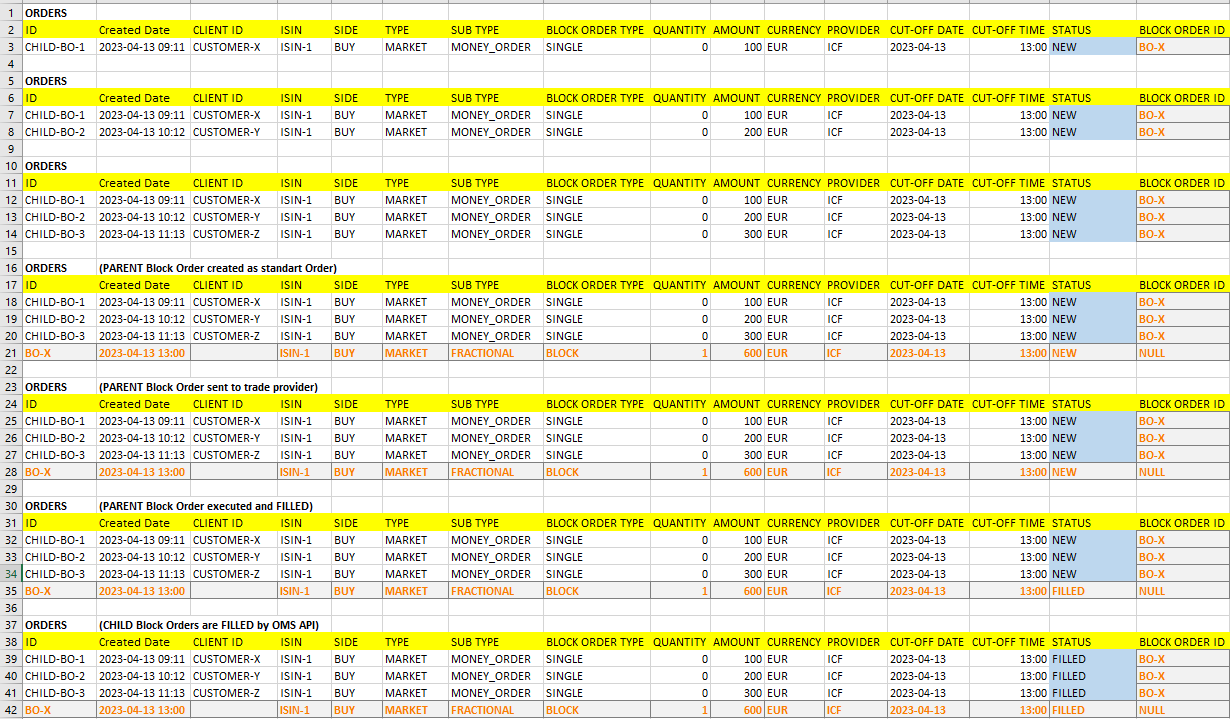
Here is an example Orders table in OMS:
- Every hour, new CHILD Block Orders are placed via the OMS API.
- Then, at the cutOffDate and cutOffTime, a PARENT Block Order is created as an aggregated
TradeOrderentity with statusNEW.