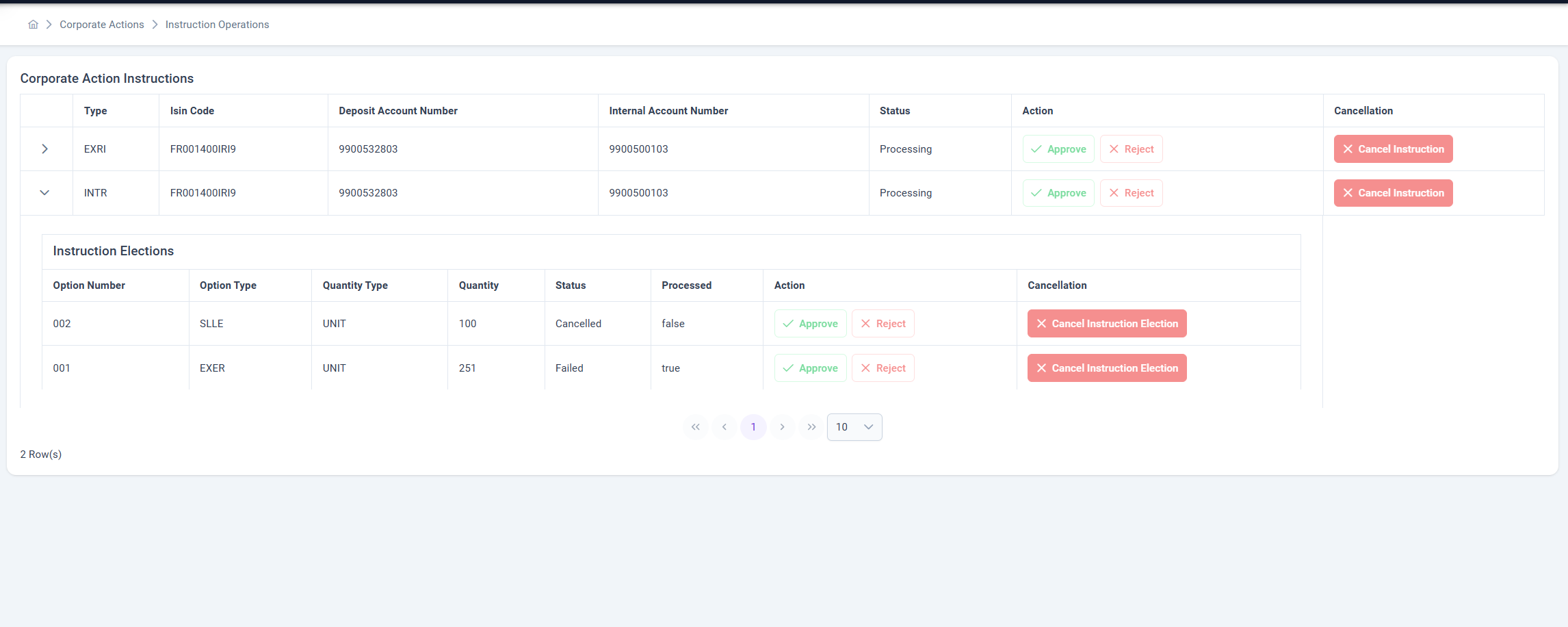
Instruction Operations
The Instruction Operations page is part of the Corporate Actions module and is designed to manage submitted Corporate Action Instructions and their related Instruction Elections.
It provides a centralized view where authorized users can approve, reject, or cancel both instructions and their sub-level elections.
📋 Overview
Each Corporate Action Instruction represents a specific action request for a given ISIN and Deposit Account, and may contain multiple Instruction Elections representing sub-choices or options within the corporate action.
The page includes:
- Corporate Action Instructions table (main level)
- Instruction Elections table (expandable details for each instruction)
🧠 Core Features
✅ Approve / ❌ Reject
Both Instructions and Instruction Elections can be approved or rejected by authorized users.
Rules:
- Approval or rejection actions are only available when the current Status = Waiting Approval.
- Once approved, the record moves to the next processing step in the corporate action workflow.
- Once rejected, the record becomes locked and cannot be processed further.
- Approval and rejection actions are logged for compliance and audit tracking.
Available Actions:
| Level | Action | Condition |
|---|---|---|
| Instruction | Approve / Reject | Only if Status = Waiting Approval |
| Instruction Election | Approve / Reject | Only if Status = Waiting Approval |
❌ Cancel Instruction
The Cancel Instruction button allows authorized users to cancel a full instruction, including all its elections.
When this button is clicked:
- The instruction’s status is set to Cancelled.
- All related Instruction Elections are also marked as Cancelled.
- The cancellation is recorded in system logs.
- The action is only available if
Status = Waiting Approval.
❌ Cancel Instruction Election
The Cancel Instruction Election button allows users to cancel an individual election within an instruction without affecting the entire instruction.
When triggered:
- The selected election’s status changes to Cancelled.
- Other elections within the same instruction remain unaffected.
- The cancellation is only available if
Status = Waiting Approval.
🔐 Access Control
Note:
The Instruction Operations page and all related approval and cancellation actions can be performed only by users with thetenant_managementrole.
🧩 Summary of Status Requirements
| Action Type | Target | Required Status | Resulting Status |
|---|---|---|---|
| Approve | Instruction / Election | Waiting Approval | Approved |
| Reject | Instruction / Election | Waiting Approval | Rejected |
| Cancel Instruction | Instruction | Waiting Approval | Cancelled |
| Cancel Instruction Election | Election | Waiting Approval | Cancelled |
🕵️ Audit and Traceability
All user actions (Approve, Reject, Cancel) are automatically logged with:
- Timestamp
- User ID and Role
- Action Type and Target
- Old and New Status
This ensures full traceability and audit compliance.
Page Access:
tenant_management