File Exchange
The File Exchange module is located under the System section of the Koala application. It is designed to manage the transfer of financial and operational files between Koala and external institutions or systems.
This module is primarily used for:
- Exchanging SWIFT-based transactional files (e.g., MT535, MT940)
- Managing both incoming and outgoing file flows
- Tracking and auditing file statuses and delivery
The File Exchange module is divided into two main components:
📤 Manual File Exchange
This section allows users to manually upload files into the system. It is typically used when:
- An institution needs to submit a file manually instead of via automated integrations
- Internal users need to test or backload files for reconciliation or correction purposes
Users can:
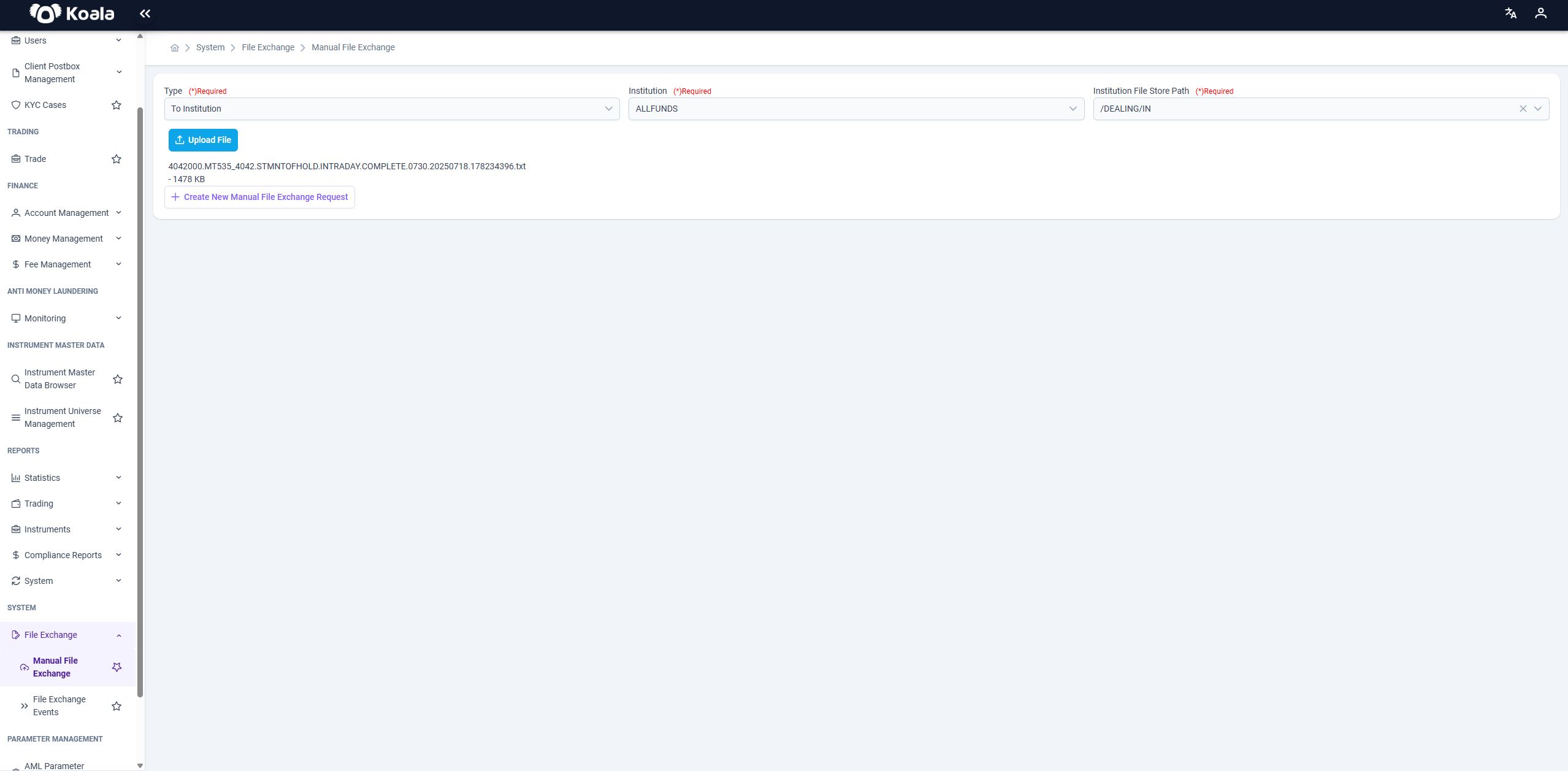
- Select the target institution
- Choose the file type and operation
- Upload
.ISOor.TXTformat files via UI
🧾 Input Fields
Before uploading a file, three required fields must be selected:
| Field | Description |
|---|---|
| 📌 Type | Defines the direction of file delivery. Usually set as To Institution |
| 🏛️ Institution | Target financial institution to which the file will be sent (e.g., ALLFUNDS) |
| 📂 Institution File Store Path | The storage folder on the institution’s side where the file will be dropped (e.g., /DEALING/IN) |
These fields are mandatory. The upload process cannot continue unless all of them are properly filled.
📎 File Upload
Once the input fields are completed:
- Click the Upload File button.
- Select the desired
.txt,.iso, or similar format file. - After selection, the file will appear as a line with:
- File name
- Size (in KB)
Each uploaded file gets registered and queued for dispatch to the selected institution.
➕ Create New Request
You can click Create New Manual File Exchange Request to:
- Clear current inputs
- Start a new manual upload process
- Upload another file to a different institution or directory
This is useful when you have multiple manual dispatches to perform in a session.
🧠 Additional Notes
- Manual uploads are logged and tracked in the File Exchange Events screen for audit purposes.
- Files are delivered to the selected institution’s FTP or SFTP directory.
- File naming conventions (like
MT535,MT940) usually reflect SWIFT standards and determine how the file will be processed by downstream systems.
🛡️ Always ensure the correct
InstitutionandStore Pathare selected to prevent misdelivery.
📄 File Exchange Events
This is the reporting and monitoring section for all file-based transactions. Whether uploaded manually or received via integration, every file’s processing lifecycle is logged here.
It allows operations and compliance teams to:
- Track the delivery and processing status of each file
- See metadata such as file type, size, creation date, and storage path
- Investigate failures or delays in file transfer
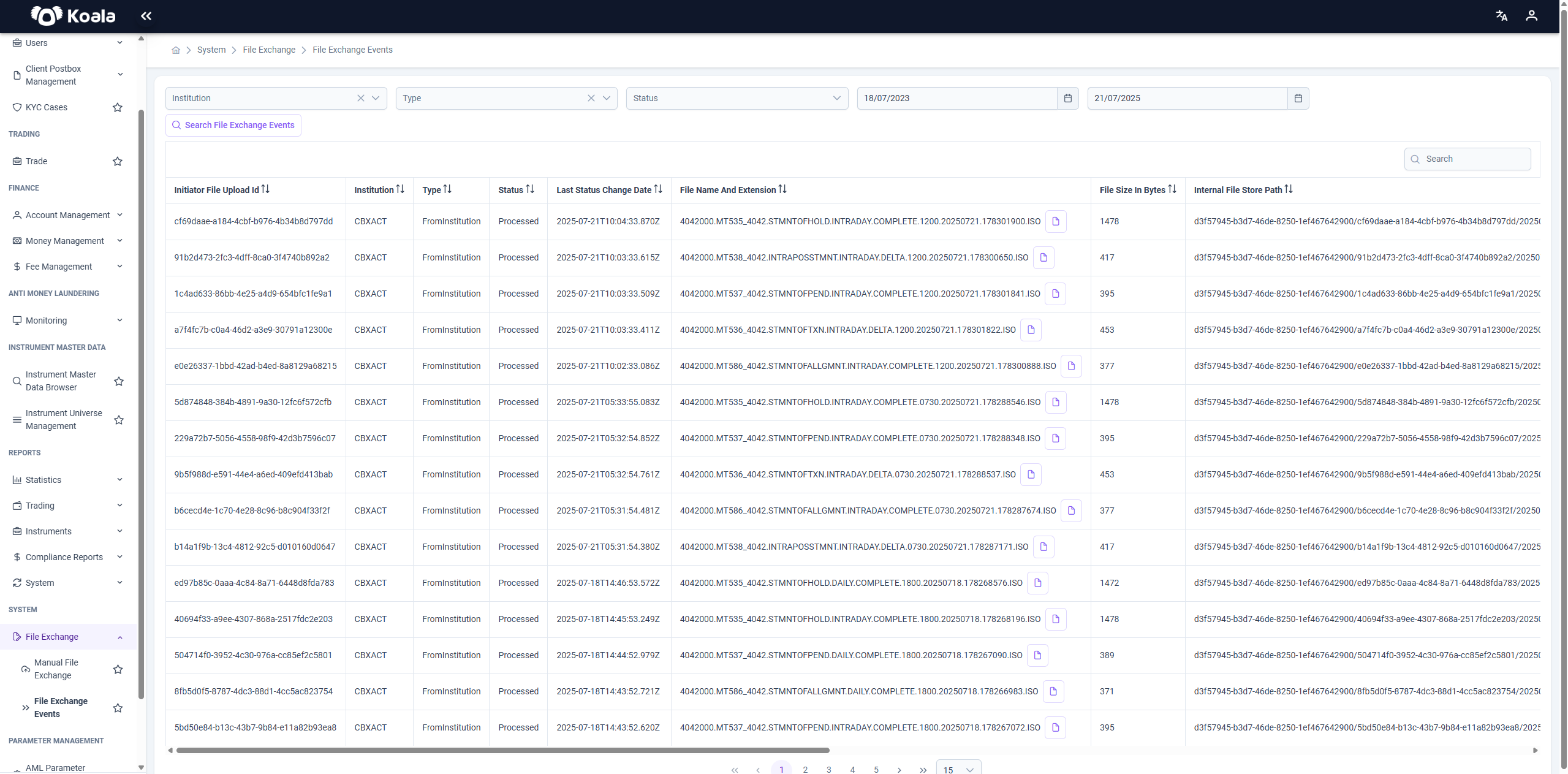
The File Exchange Events screen provides a searchable and filterable audit log of all files transferred through the system.
🧭 Filters
You can filter records using:
- Institution: The entity involved in the file exchange (e.g., CBXACT)
- Type: Direction of the file flow (
FromInstitutionorToInstitution) - Status: Processing result of the file (
Processed,Failed, etc.) - Date Range: From/to dates based on file status change time
Click Search File Exchange Events to apply filters and refresh the table.
📋 File Exchange Event Table
Each row in the table represents a file exchange event and includes the following columns:
| Column | Description |
|---|---|
| Initiator File Upload Id | Unique identifier for the file |
| Institution | Institution from/to which the file is exchanged |
| Type | Direction of the file (FromInstitution / ToInstitution) |
| Status | File processing result (e.g., Processed) |
| Last Status Change Date | Timestamp when the file status was last updated |
| File Name and Extension | Full name of the file, typically in SWIFT format (e.g., MT535, MT940) |
| File Size in Bytes | File size for verification or auditing |
| Internal File Store Path | Backend storage location identifier |
| 📄 (File Icon) | Click to download or view the file (if permissions allow) |
📝 Notes
- The most commonly seen file types are:
MT535,MT940,MT950, andMT538, usually part of trade and reconciliation workflows. - The file list is paginated for performance and scalability.
- This screen plays a critical role in daily reconciliations, troubleshooting file delays, or ensuring external partners have sent/received required data.
🛡️ The File Exchange Events screen acts as a single point of truth for all file-level communication and ensures transparency and traceability in institutional file flows.