🤝 Contractual Partners
The Contractual Partner module is used to manage third-party financial service providers or intermediaries that have contractual agreements with the platform. This may include banks, brokers, custodians, or distributors. These entities can be associated with users, clients, or instruments for routing, compliance, and reporting purposes.
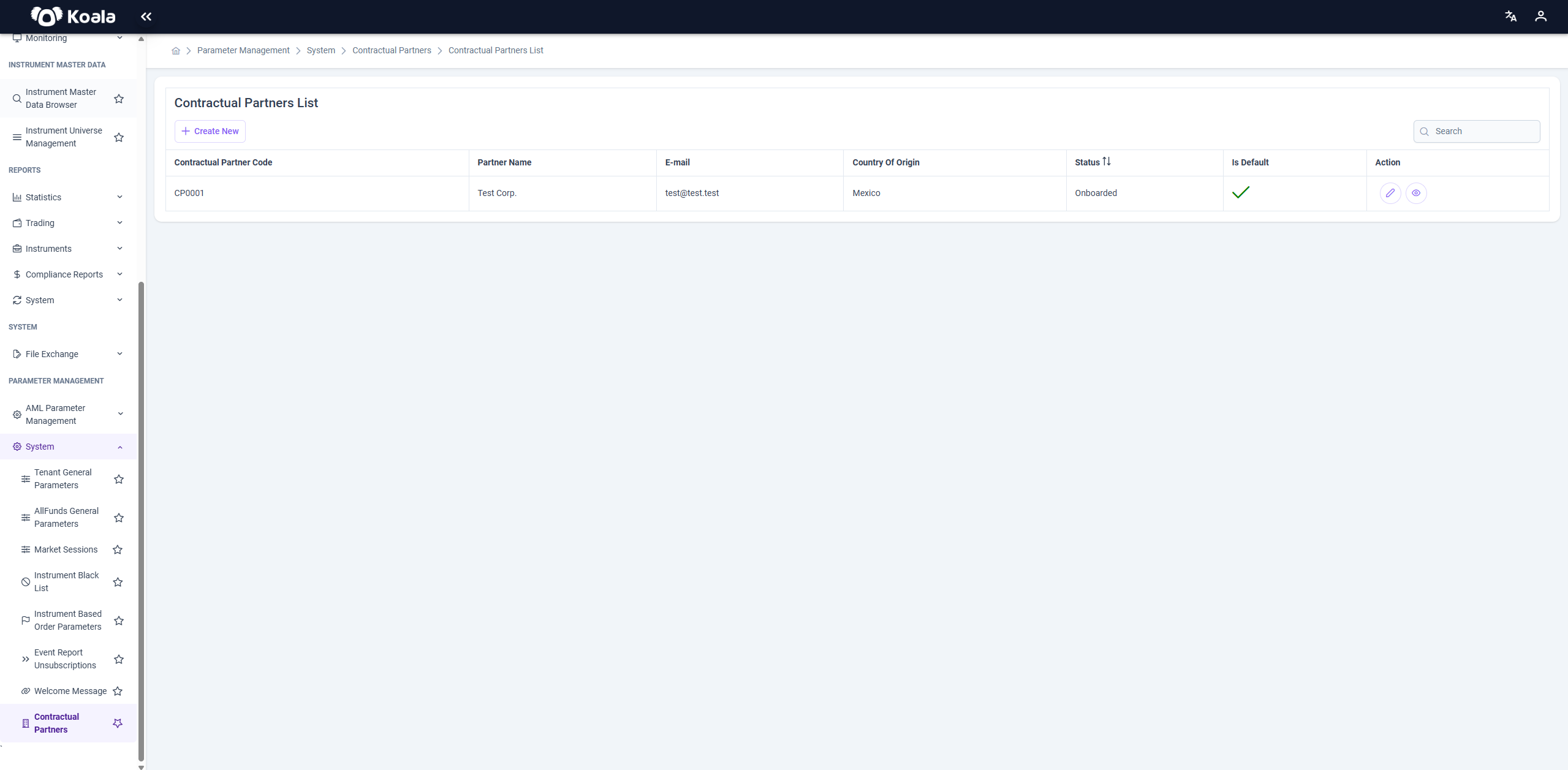
🔍 Table Controls
At the top of the table:
- ➕ Create New: Opens a dialog to register a new contractual partner.
- Search Input: Allows quick filtering by any visible field (e.g., name, email).
📑 Table Columns
| Column | Description |
|---|---|
| Contractual Partner Code | System-generated identifier. |
| Partner Name | Official name of the partner institution. |
| Primary contact email. | |
| Country of Origin | Country where the partner is registered. |
| Is Default | Indicates whether this partner is the default for the tenant. |
| Action | ✏️ Edit or 👁️ View actions. |
➕ Create New Contractual Partner
Clicking the Create New button opens a new page (Create Contractual Partner page) where users must provide the following required fields:
| Field | Description |
|---|---|
| Partner Name | 🔴 Required |
| 🔴 Required | |
| Country of Origin | 🔴 Required |
| Web Site URL | 🔴 Required |
| Contract Start Date | 🔴 Required |
| Contract End Date | 🔴 Required |
| Upload Logo | Upload partner’s logo for branding or identification. |
This form is used to onboard a new contractual partner into the system.

📝 Update Contractual Partner
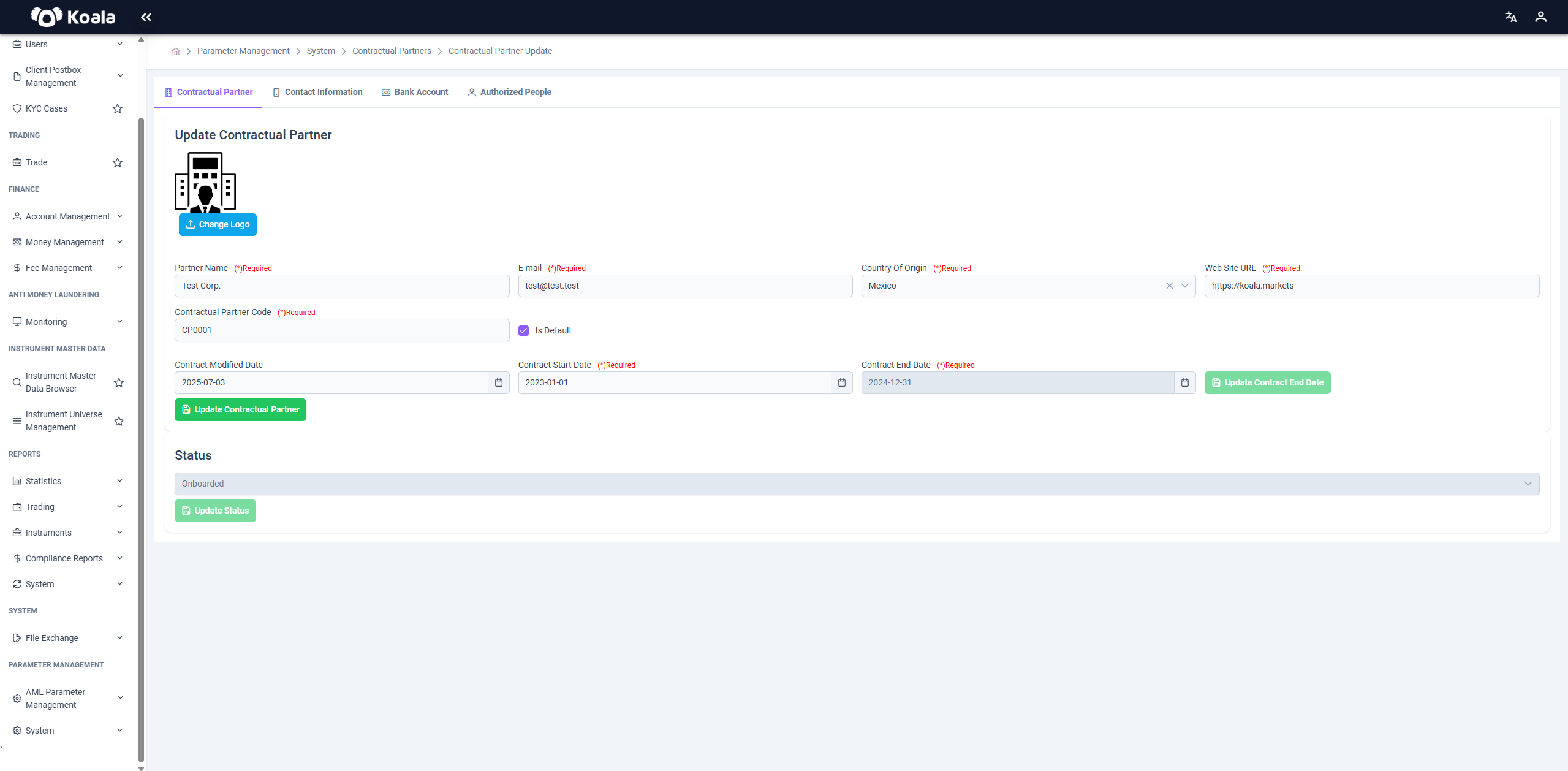
Clicking the ✏️ Edit icon opens a new page (Update Contractual Partner page) where all fields from the creation screen are pre-filled, with additional fields and tabs for more advanced configuration:
| Field | Notes |
|---|---|
| Contractual Partner Code | 🔴 Required |
| Is Default | Checkbox to mark this partner as the default one. |
| Contract Modified Date | Auto-filled timestamp of last update. |
| Contract Start Date | 🔴 Required |
| Contract End Date | 🔴 Required ⚠️ Only editable by Tenant_Management role. |
Status (e.g., Onboarded) | ⚠️ Only editable by Tenant_Management. |
Additional Tabs:
- 📍 Contact Information
- 🏦 Bank Account
- 👤 Authorized People
Each of these tabs allows for Create, Update, and/or Delete operations as applicable (see below sections for details).
🧾 Additional Tabs in Contractual Partner Update Screen
When editing an existing Contractual Partner (via the ✏️ Edit icon), the following additional tabs become available to manage related information.
Each tab serves a distinct purpose in ensuring the completeness of the contractual partner profile.
📍 Contact Information Tab
Enables management of contact details for the partner:
- Address
- Phone Number
Supports standard Create, Update, and Delete operations.

🏦 Bank Account Tab
Used to store financial account information of the contractual partner.
➕ Create New Bank Account
Table Columns:
| Column | Description |
|---|---|
| Account Holder Name | Name of the account owner |
| Bank Name | Name of the bank |
| Account Number | Bank account number |
| Sort Code | Branch sort code (if applicable) |
| BIC | Bank Identifier Code |
| Country Of Origin | Country where the account is held |
| Action | 🗑️ Delete only (No edit option) |
Only Create and Delete operations are supported.

👤 Authorized People Tab
Used to maintain individuals who are authorized to act on behalf of the partner.
➕ Create New Authorized Person
Table Columns:
| Column | Description |
|---|---|
| Name | First name of the authorized person |
| Surname | Last name |
| Contact email | |
| Identity Number Type | Type of identification (e.g., Passport, ID) |
| Identity Number | Unique identifier number |
| Action | ✏️ Update / 🗑️ Delete |
Create, Update, and Delete actions are fully supported in this tab.

These sections enhance the data accuracy and regulatory readiness of the platform by allowing detailed configuration and record-keeping for contractual partners.
🔧 Contractual Partner General Parameters
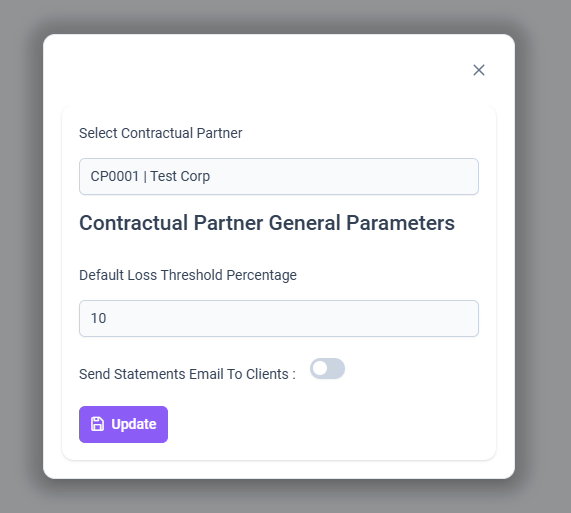
Clicking the eye icon (👁️) opens the Contractual Partner General Parameters dialog.
⚠️ This dialog is editable. Users can modify the general behavior and settings of the selected contractual partner.
🔧 Editable Fields
| Field | Description |
|---|---|
| Default Loss Threshold Percentage | Example: 10 – Used for risk configurations and tolerance thresholds in financial operations. |
| Send Statements Email to Clients | Boolean flag (default: false). When enabled, the system will automatically send periodic statements to clients linked to this partner. |
✅ Changes made in this dialog are applied immediately to the behavior of the associated partner across the platform.
🔐 Role-Based Restrictions
The Contractual Partner module includes specific field-level access controls to ensure proper data governance across roles.
| Field/Action | Accessible Only by |
|---|---|
| Contract End Date | Tenant_Management |
| Status Field (e.g., Onboarded) | Tenant_Management |
All other fields and actions (e.g., updating partner name, email, website URL, uploading logo, setting defaults)
can be modified by the following roles:
Tenant_AdminTenant_API
📌 Notes
- Contractual partners are linked to various parts of the platform (e.g., client onboarding, order routing).
- Only one partner can be marked as default per tenant.
- Uploaded logos can be used in downstream documentation and client portals.
✅ Use Cases
- Managing KYC & contractual data for broker/distributor relationships.
- Configuring default service providers per tenant.
- Integrating with partner-specific business rules or branding.