💬 Welcome Message
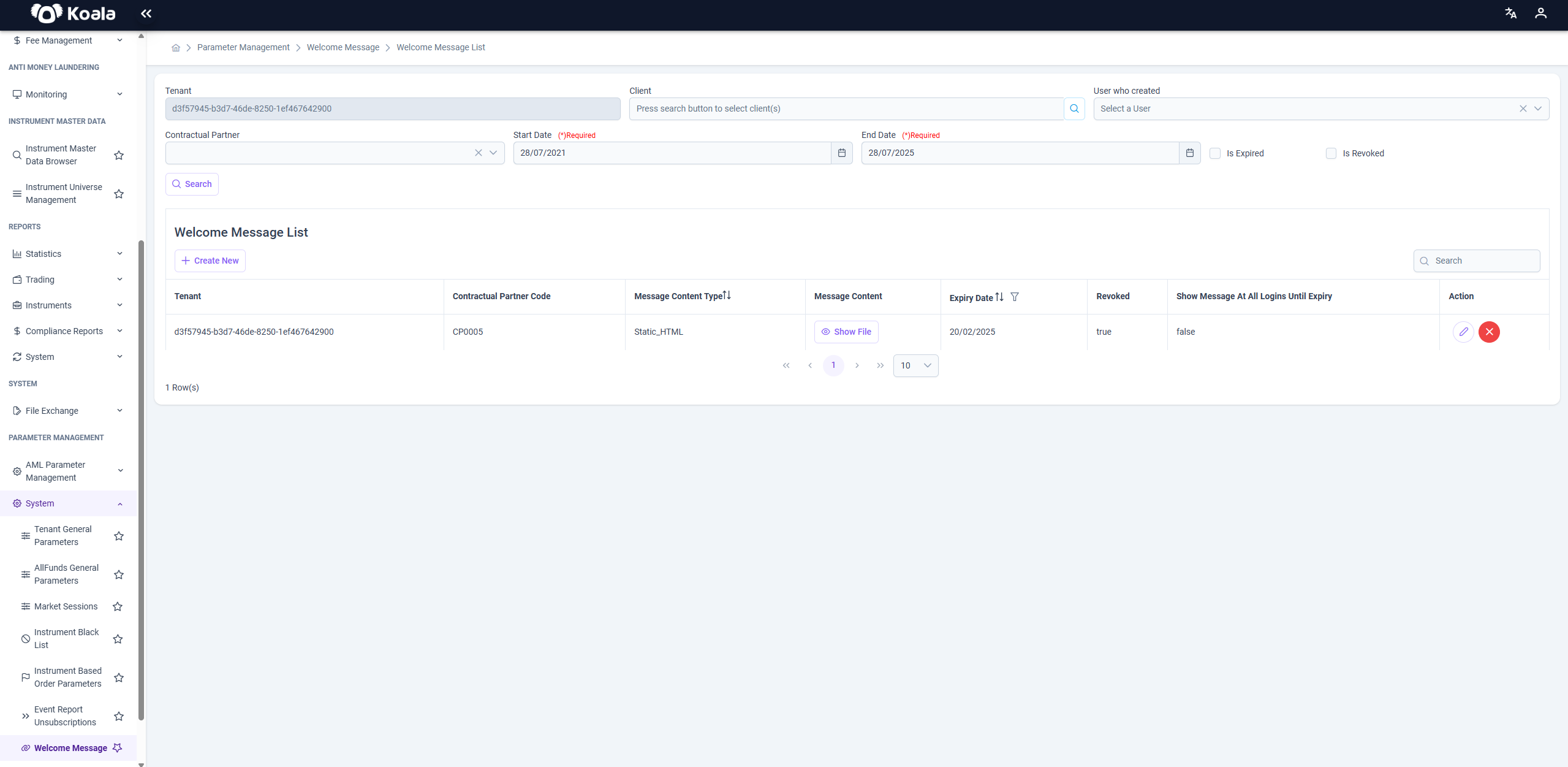
The Welcome Message module in Koala.Markets allows platform administrators to broadcast general-purpose messages to users upon login. This is typically used for seasonal greetings (e.g., holidays), critical announcements, or broad platform notifications.
🎯 Purpose
The system enables sending predefined messages to:
- All clients or specific targeted clients
- Users logging into the platform
- Communicate important updates, greetings, or maintenance notifications
🛠️ Search & Filter Parameters
The top section provides filtering options to locate messages based on various metadata:
| Parameter | Description |
|---|---|
| Tenant | Required. Filters messages for a specific tenant. |
| Client | Optional. Search and filter by client(s). |
| User Who Created | Filter based on the creator of the message. |
| Start Date / End Date | Required. Defines the date range for message creation. |
| Is Expired | Filters only expired messages. |
| Is Revoked | Filters revoked messages. |
Click the 🔍 Search button to apply filters.
A global search box is also available to quickly find records in the table.
📄 Table Columns
| Column | Description |
|---|---|
| Tenant | Tenant ID for which the message is defined. |
| Contractual Partner Code | Identifier for the contractual partner. |
| Message Content Type | Indicates the type of content (HTML, image, PDF, etc.). |
| Message Content | "Show File" button to preview content. |
| Expiry Date | Date after which the message becomes invalid. |
| Revoked | Boolean indicating if the message has been revoked. |
| Show at All Logins Until Expiry | Indicates if the message is displayed on each login. |
| Action | Edit or revoke the message. |
➕ Create New Message
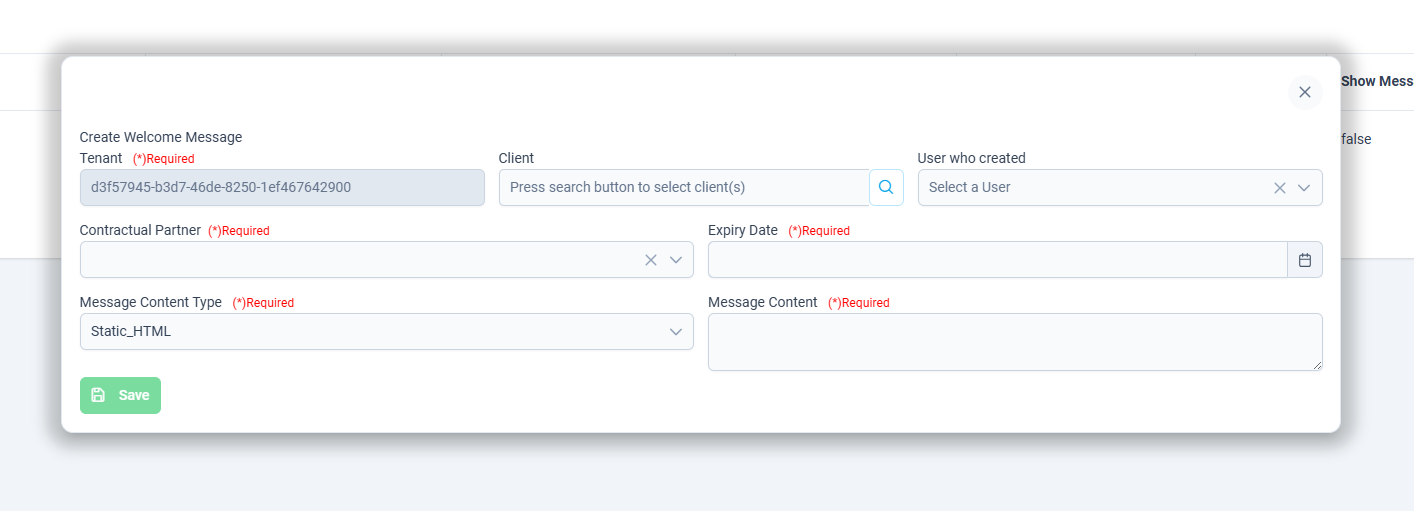
Clicking the + Create New button opens the message creation form, allowing administrators to define a welcome message to be shown to users upon login.
📋 Form Fields
| Field | Required | Description |
|---|---|---|
| Tenant | ✅ Yes | Automatically prefilled based on current context. Defines the tenant scope of the message. |
| Client | ❌ No | Optional. Select one or more clients if the message should be targeted rather than global. |
| User Who Created | ❌ No | Automatically filled with the current user creating the message. |
| Contractual Partner | ✅ Yes | Select the contractual partner associated with the message. |
| Expiry Date | ✅ Yes | The date after which the message will no longer be shown. |
| Message Content Type | ✅ Yes | Choose the format of the message content. Supported types: Static_HTML - Image_PNG, Image_JPEG - Document_PDF - External_URL |
| Message Content | ✅ Yes | Depending on the selected content type, upload or enter the appropriate message body or file. |
Once all required fields are filled, the message can be saved and will be visible in the message list.
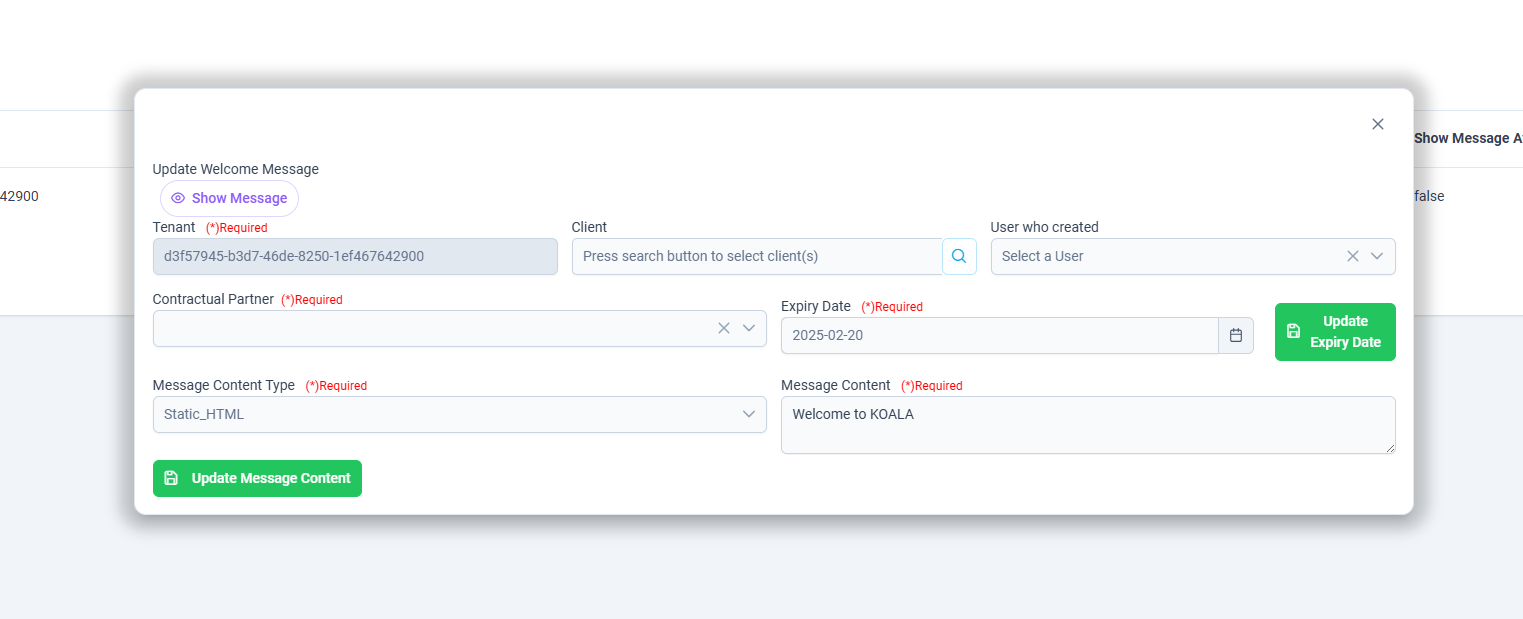
✏️ Edit & Revoke
Each message entry has action buttons:
- 🖉 Edit: Opens the update screen, allowing modification of all fields, including content, expiry, and client targeting.
- ❌ Delete/Revoke: Removes the message or marks it as revoked.
Note: Messages can be updated and revoked simultaneously.
🧩 Use Cases
- Seasonal Greetings: New year, holiday or Eid messages to all users.
- Maintenance Alerts: Notify clients about upcoming platform downtime.
- Regulatory Notices: Broadcast urgent compliance-related messages.
⚠️ Messages will not appear to users once the expiry date is reached or if the message is revoked manually.