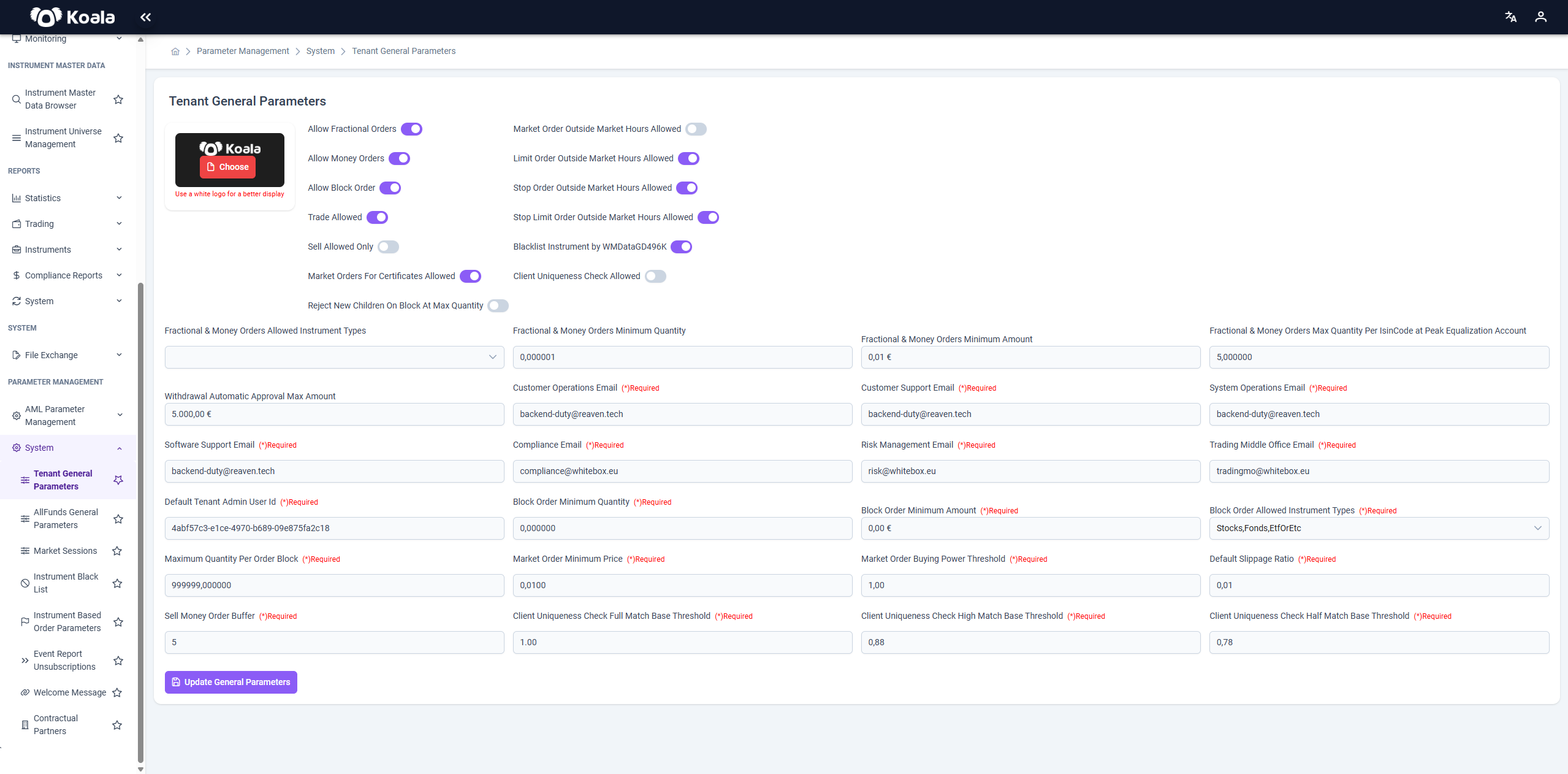
⚙️ Tenant General Parameters
The Tenant General Parameters section defines system-wide default behaviors and operational constraints specific to a tenant on the Koala platform. These configurations directly influence transaction permissions, communication settings, order types, risk controls, and compliance logic.
This page is typically maintained by platform administrators or client onboarding teams to ensure the tenant's trading operations align with regulatory, business, and technical expectations.
🎨 Topbar Logo Configuration
At the top-left of the screen, there is a logo upload area.
- This logo determines what is shown in the topbar (header) of the entire Koala application for the selected tenant.
- The system recommends:
"Use a white logo for a better display"
This ensures better visibility against the dark background typically used in the top navigation bar.
🧩 Key Toggles and Feature Switches
| Parameter | Description |
|---|---|
| Allow Fractional Orders | Enables submission of fractional (non-integer) order quantities for supported instruments. |
| Allow Money Orders | Allows placing orders based on monetary value rather than quantity. |
| Allow Block Order | Activates support for block trades—large volume orders usually processed outside standard order books. |
| Trade Allowed | Globally enables or disables trading for the tenant. Must be active for any order to be processed. |
| Sell Allowed Only | Restricts trading to sales only. Buy orders will be rejected. Useful for offboarding scenarios. |
| Market Orders For Certificates Allowed | Enables market orders for financial certificates (e.g., structured products). |
| Reject New Children On Block At Max Quantity | Prevents spawning of new child orders in block trades once max quantity is reached. |
| Market Order Outside Market Hours Allowed | Allows market orders to be queued even when markets are closed. |
| Limit Order Outside Market Hours Allowed | Enables limit orders submission outside standard market hours. |
| Stop Order Outside Market Hours Allowed | Permits stop orders to be placed beyond active trading hours. |
| Stop Limit Order Outside Market Hours Allowed | Allows stop-limit orders to be accepted when markets are closed. |
| Blacklist Instrument by WMDataGD49K | Enables instrument blacklisting based on WMData identifiers (e.g., for compliance or restriction purposes). |
| Client Uniqueness Check Allowed | Activates client uniqueness checks to prevent duplicates during onboarding or order routing. |
📝 Configuration Fields
| Field | Description |
|---|---|
| Fractional & Money Orders Allowed Instrument Types | Specifies which instruments support fractional and money-based orders (e.g., Stocks, ETFs). |
| Fractional & Money Orders Minimum Quantity | Minimum order quantity when using fractional or money-based formats. Prevents micro orders. |
| Fractional & Money Orders Minimum Amount | Sets the minimum notional amount (in €) for money orders. |
| Fractional & Money Orders Max Quantity Per IsinCode at Peak Equalization Account | Limits the maximum holding per instrument (ISIN) in the equalization account. |
| Withdrawal Automatic Approval Max Amount | Defines the threshold (in €) under which withdrawal requests are auto-approved. |
| Software Support Email | Email address used for internal support escalation or technical assistance. |
| Customer Operations Email | Primary contact email for customer-facing operational issues. |
| Customer Support Email | Customer-facing support channel for end-user inquiries. |
| System Operations Email | Internal team email for system-level alerts or escalations. |
| Compliance Email | Contact address for compliance team to receive alerts or policy violations. |
| Risk Management Email | Dedicated email for risk-related notifications or threshold breaches. |
| Trading Middle Office Email | Routing email for the trading desk or middle-office interventions. |
| Default Tenant Admin User Id | User ID of the default tenant admin for audit logging and fallback actions. (Contact us if you want to change the Default tenant admin user id) |
| Block Order Minimum Quantity / Amount | Minimum threshold required to qualify an order as a block trade. |
| Block Order Allowed Instrument Types | Lists instrument types eligible for block trades (e.g., Stocks, Funds). |
| Market Order Minimum Price | Minimum acceptable price for market orders to ensure valid executions. |
| Market Order Buying Power Threshold | Buying power (in €) that must be available for market order validation. |
| Maximum Quantity Per Order Block | Upper limit on how much can be traded within a single block order. |
| Sell Money Order Buffer | An additional buffer applied to money-based sell orders to avoid underflows. |
| Default Slippage Ratio | Default ratio used to estimate slippage tolerance in order execution. |
| Client Uniqueness Check Full Match Base Threshold | Similarity threshold (%) for considering two clients as identical (100% = exact match). |
| Client Uniqueness Check High Match Base Threshold | High-confidence threshold for near-duplicates; used in fuzzy matching. |
| Client Uniqueness Check Half Match Base Threshold | Lower boundary for client matching, allowing more leniency in identification. |
✅ Purpose
This configuration panel enables precise, granular control over tenant-specific behavior, directly impacting:
- Trade permissioning
- Risk and compliance workflows
- Order validation logic
- Support and notification routing
- Market behavior outside standard hours
💡 Tip: Changes in this screen often have immediate effect, so they should be reviewed and tested in a staging environment before being deployed to production.