📑 Corporate Actions
Corporate Actions are events initiated by a corporation that directly affect its shareholders. These may include dividends, interest payments, rights issues, capital increases, or other financial decisions.
In the Koala platform, the Corporate Actions Dashboard provides an overview of such events, enabling users to review, monitor, and take the necessary actions.
The Corporate Actions Module provides clients with a clear overview of corporate events and allows them to register their elections when applicable. Corporate actions can be mandatory (no shareholder choice required) or voluntary (shareholders must decide).
📊 Corporate Actions Dashboard
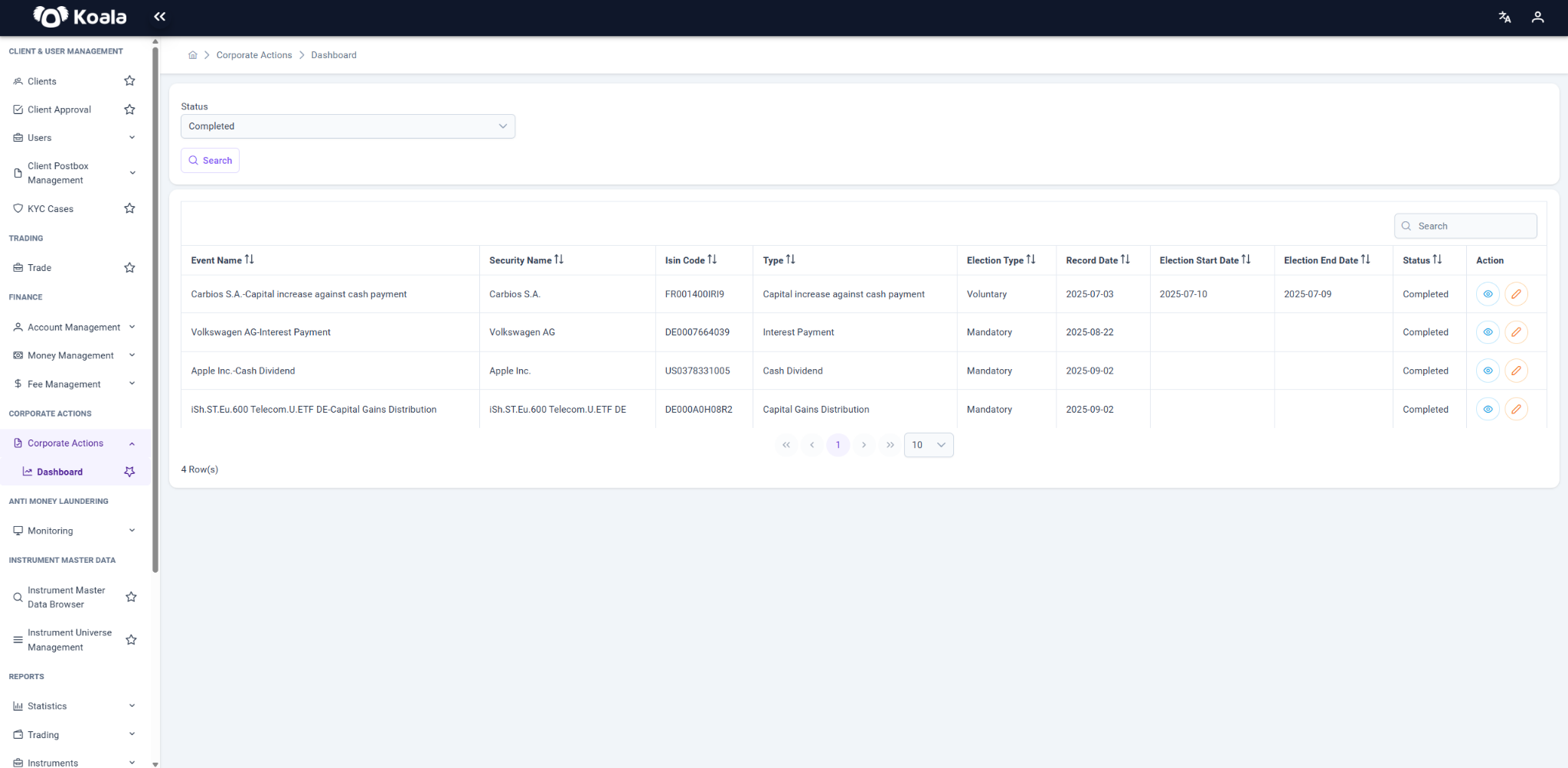
The dashboard displays all corporate actions relevant to the client.
Key Columns
- Event Name → The name of the corporate action (e.g., Dividend Payment, Capital Increase).
- Security Name → The underlying security (share, bond, etc.).
- ISIN Code → International identifier of the security.
- Type → The corporate action type (see Corporate Action Types).
- Election Type → Whether the event is Mandatory or Voluntary.
- Record Date → The cut-off date to determine eligible shareholders.
- Election Start/End Date → Timeline in which shareholders may submit elections.
- Status → Event progress (Pending, Completed, etc.).
- Action →
- 👁 View → Opens detailed view.
- ✏️ Register Choices → Opens election input form (only for voluntary events).
👁 Corporate Action Details
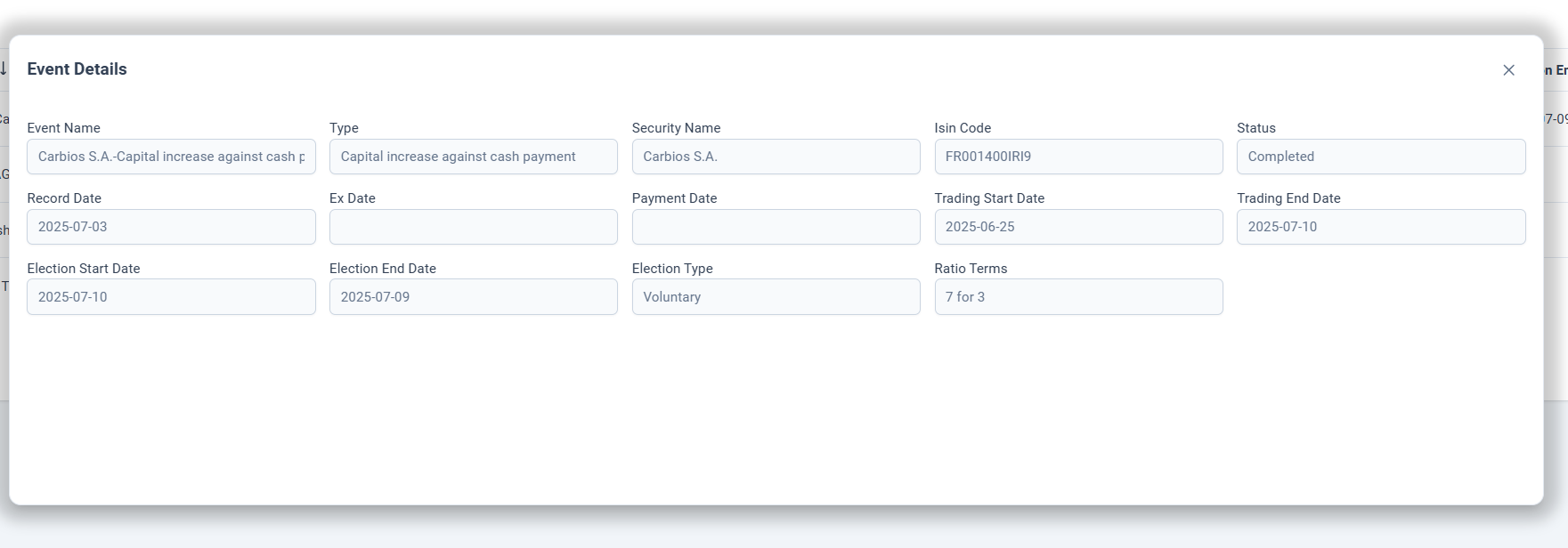
Clicking the View icon provides extended details:
- General Info → Corporate Action Type, Election Type (mandatory/voluntary), Status.
- Important Dates → Election start and end dates, Record Date.
- Additional Info (depending on CA type):
- Exercise Price (for rights issues)
- Selling Price (for rights trading)
- Total Rights Available
✏️ Register Choices
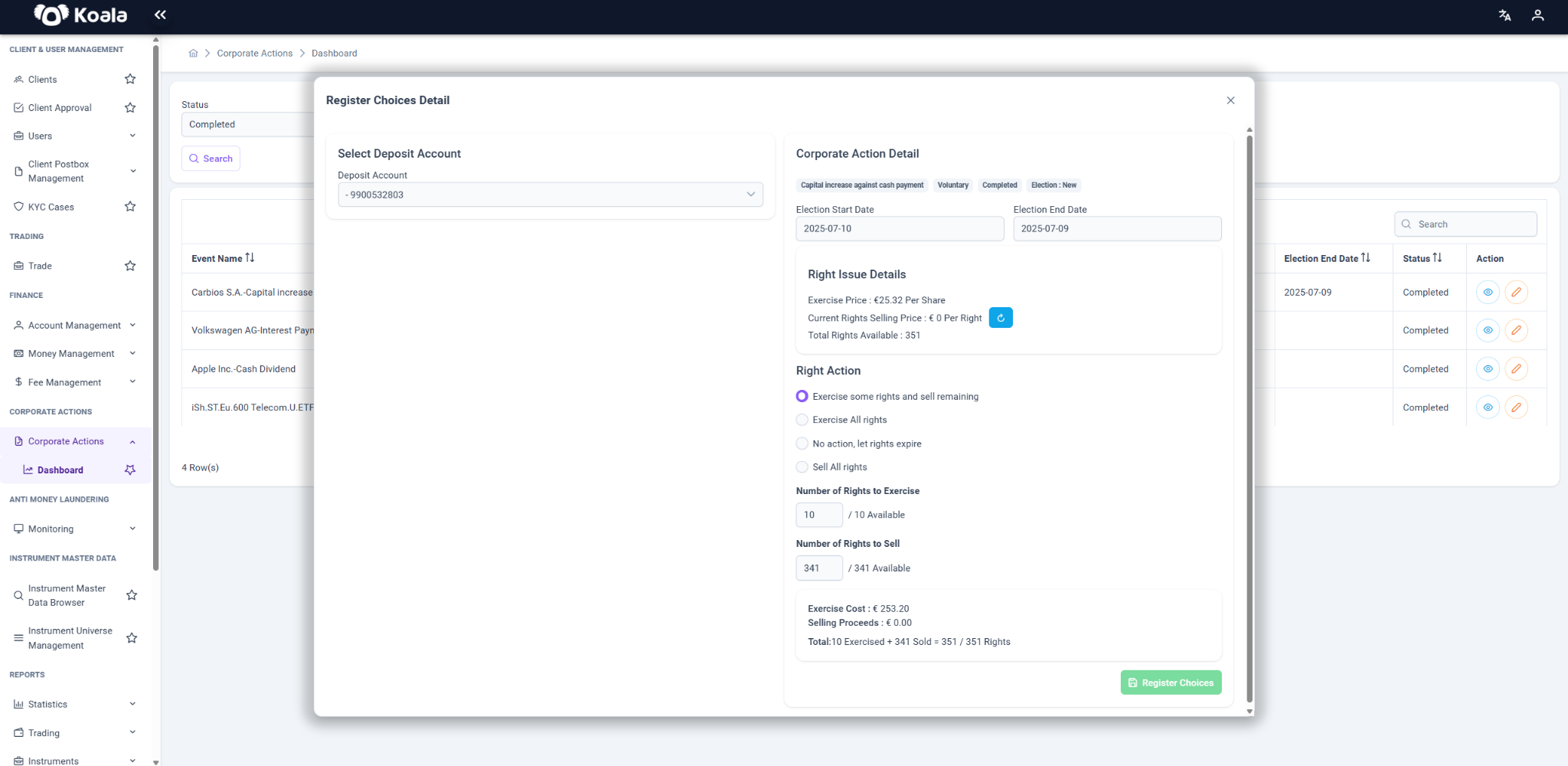
The Register Choices form is used for voluntary events where the shareholder must submit an election.
Common Sections
- Deposit Account → The account through which the election will be processed.
- Election Options → The available actions, based on the Corporate Action Type.
- Quantity / Value Inputs → Fields such as number of rights exercised, rights sold, or shares chosen.
- Summary → Displays calculated totals (e.g., cost of exercising, proceeds from selling).
The form dynamically adapts based on the Corporate Action Type and Election Option Types provided by the issuer.
❌ Cancel Instruction
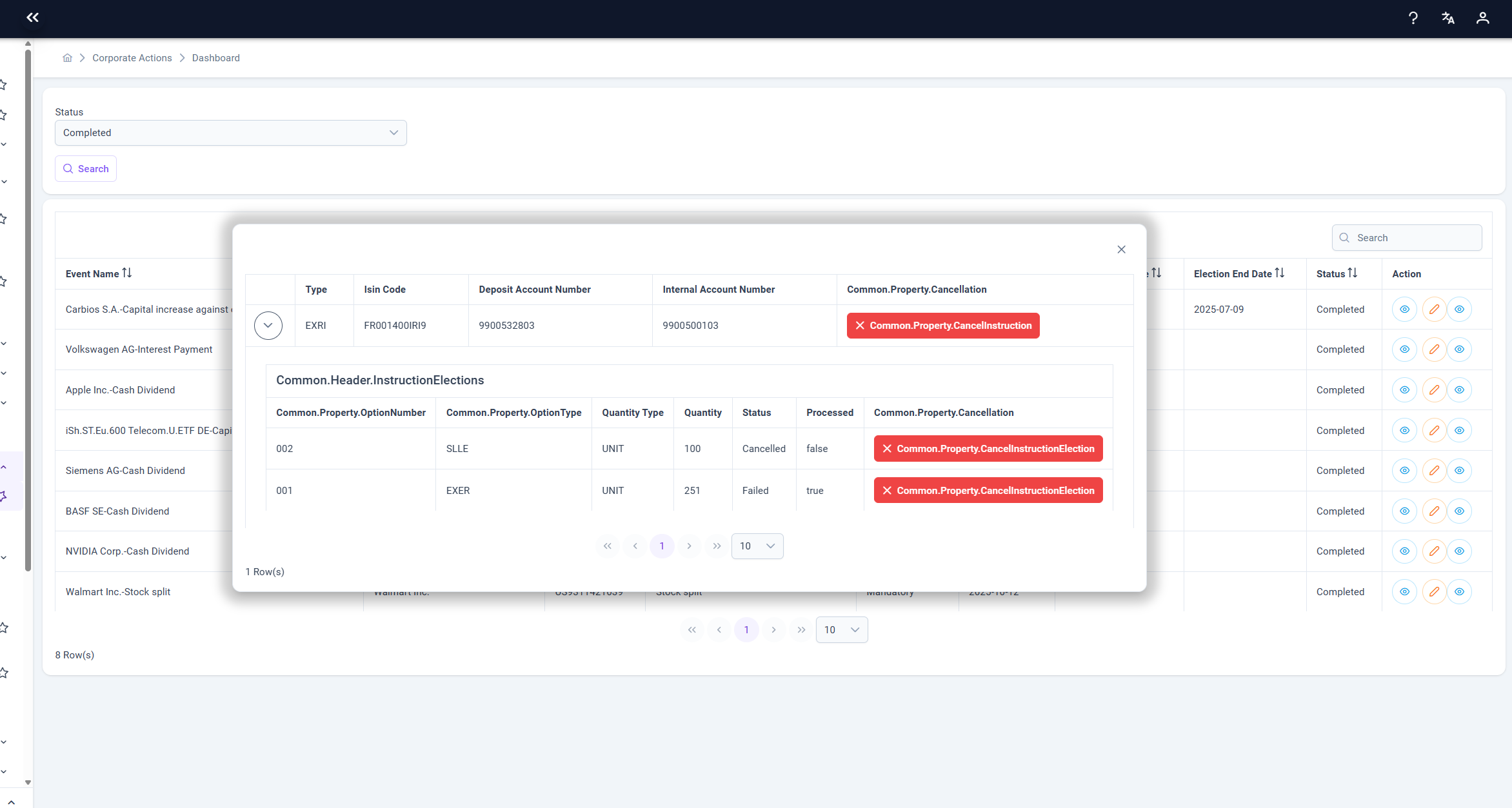
The Cancel Instruction button allows authorized users to manually cancel a submitted Corporate Action Instruction before or after processing, depending on the event’s status and system configuration.
When triggered:
- The selected Corporate Action Instruction and all associated Instruction Elections are marked as Cancelled.
- The system logs the cancellation action for audit tracking.
- Cancellation becomes irreversible once confirmed.
This function ensures flexibility in handling incorrectly submitted or obsolete instructions while maintaining compliance and traceability.
🏷 Corporate Action Types
| Code | Name | Description | Typical Elections / Inputs |
|---|---|---|---|
| ADDS | Bonus Issue (Capital Increase from Company Funds) | Distribution of free bonus shares from reserves. | Automatic. No election fields. |
| CAPG | Capital Gains Distribution | Distribution of realized gains from security sales. | Mandatory. No election. |
| DVCA | Cash Dividend | Cash payment to shareholders. | Mandatory. No election. |
| REOR | Reorganization | Corporate restructuring (e.g., consolidation, name change). | Varies. May or may not require elections. |
| MEET | Meeting Announcement | Shareholder meeting invitation. | Informational only. |
| OPTI | Rights Issue with Options | Rights issued with multiple options (exercise, sell, no action). | Inputs for exercised/sold rights. |
| EXRI | Rights Issue | Issue of rights to purchase new shares. | Exercise, Sell, or No Action. |
| BONU | Bonus Issue | Free shares granted. | Mandatory. No election. |
| DVOP | Dividend with Option | Dividend where client chooses cash or shares. | Input for election choice. |
| SPLF | Stock Split | Existing shares split into multiple shares. | Automatic. No election. |
| SOFF | Spin-Off | Distribution of subsidiary shares. | Usually mandatory. |
| MRGR | Merger | Merger or consolidation of companies. | May include elections (cash vs shares). |
| LIQU | Liquidation | Distribution of assets upon dissolution. | Mandatory. No election. |
| INTR | Interest Payment | Payment of bond or debt interest. | Mandatory. No election. |
⚙️ Corporate Action Election Option Types
When an event is voluntary, shareholders are presented with one or more Election Option Types.
| Code | Description | Typical Use Case |
|---|---|---|
| EXER | Exercise rights | Used in rights issues to subscribe new shares. |
| SLLE | Sell rights | Allows selling rights in the market. |
| NOAC | No action | Shareholder does nothing; rights may expire. |
| LAPS | Lapse | Explicitly allow rights to expire. |
| ABST | Abstain | Common in meetings/voting. |
| CASE | Case-by-case decision | Applied when issuer requires special handling. |
| NOFU | No further action | After initial choice, no additional steps. |
| CONS | Consent to proposal | Used in reorganizations, mergers. |
| DCNS | Do not consent | Used in reorganizations, mergers. |
| VOTE_FOR | Vote for | Meeting election (support resolution). |
| VOTE_AGAINST | Vote against | Meeting election (oppose resolution). |
| VOTE_WITHHOLD | Withhold vote | Meeting election (neutral). |
🔄 Example: Rights Issue (EXRI)
If a company initiates a Rights Issue (EXRI), shareholders may choose:
- EXER (Exercise Rights) → Buy new shares at exercise price.
- SLLE (Sell Rights) → Sell rights in the market.
- NOAC / LAPS (No Action / Lapse) → Allow rights to expire.
Example Input Fields
- Number of Rights to Exercise
- Total Exercise Cost (calculated automatically)
- Number of Rights to Sell
- Proceeds from Selling
📝 Summary
- Mandatory corporate actions (e.g., dividends, interest payments) are processed automatically.
- Voluntary corporate actions (e.g., rights issues, dividend with option) require shareholders to register elections.
- The Register Choices form is dynamic and adapts based on:
- Corporate Action Type (CA Type)
- Corporate Action Election Option Type (Election Options)
This ensures shareholders see only relevant fields and options for each event.