📄 Reconciliation Reports
A Reconciliation Report represents the result of comparing and validating financial transactions between two systems, typically between an internal ledger and an external bank or settlement system.
Reconciliation ensures that all transactions are accounted for, balanced, and that no discrepancies exist between what the platform recorded and what was actually executed.
These reports are crucial for audit, compliance (e.g., AML), and operational accuracy in financial environments.
🔍 Filters
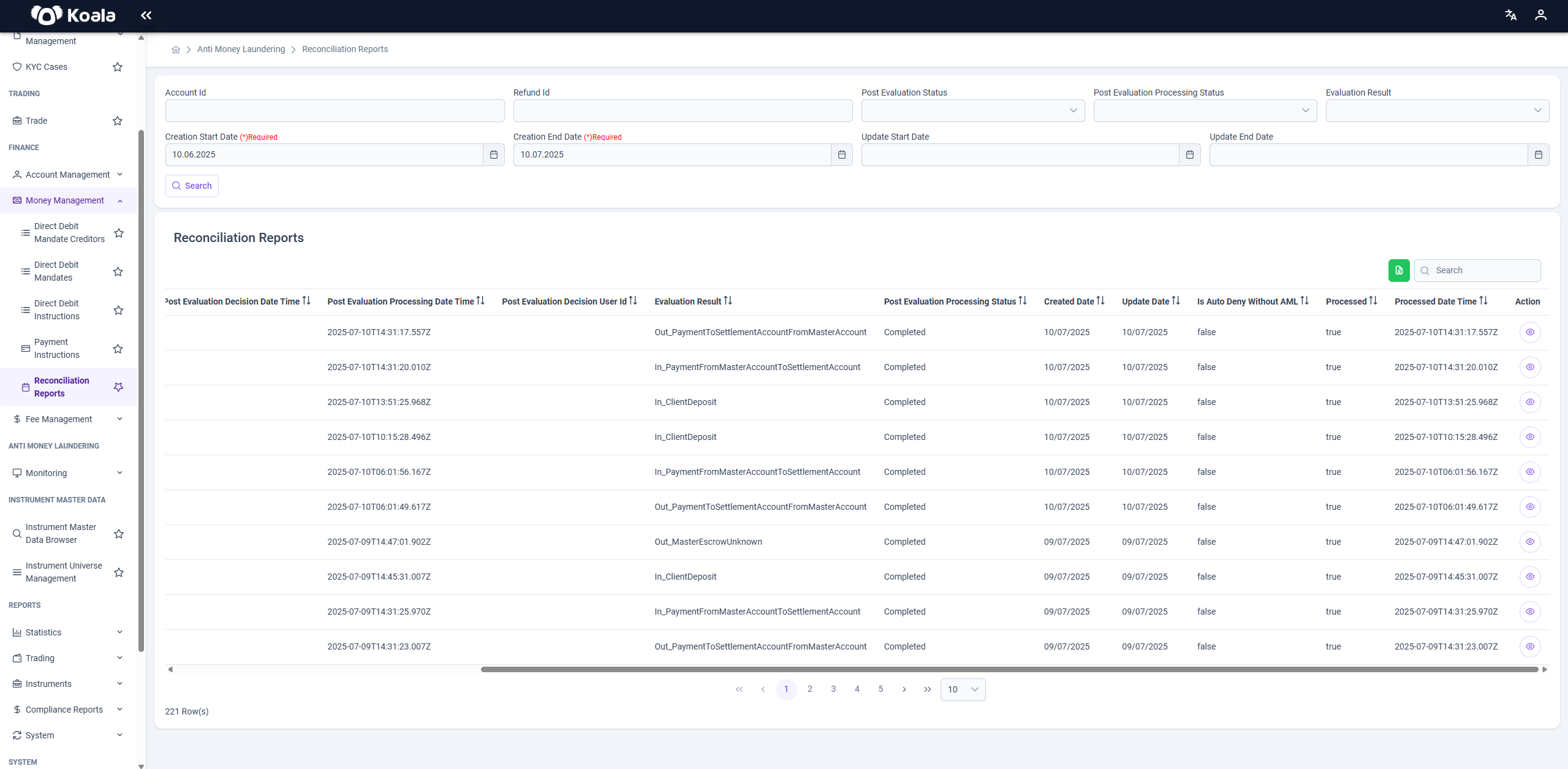
Located at the top of the page, these filters allow users to refine their search by various criteria:
- Account Id: Unique identifier of the account involved.
- Refund Id: ID of the refund transaction.
- Post Evaluation Status: Status after evaluation (e.g., Approved, Rejected).
- Post Evaluation Processing Status: Processing state (e.g., Completed).
- Evaluation Result: Outcome of reconciliation.
- Creation Start Date / End Date (Required): Mandatory date range for report generation.
- Update Start Date / End Date: Optional date range for updates.
📌 Note: Creation Start Date and End Date are required.
📋 Grid / Table Columns
The grid displays reconciliation records matching the search criteria, with these key columns:
- Account Id: Identifier of the account being reconciled.
- Refund Id: Reference to any refund involved.
- Post Evaluation Status: Status assigned after evaluation (e.g., Approved).
- Post Evaluation Decision Date/Time: When the decision was made.
- Post Evaluation Processing Date/Time: When the processing was completed.
- Post Evaluation Decision User Id: User who made the decision.
- Evaluation Result: Outcome (e.g., In_ClientDeposit, Out_PaymentToSettlementAccountFromMasterAccount).
- Post Evaluation Processing Status: Status of the processing (e.g., Completed).
- Created Date / Updated Date: Timestamps for record creation and last update.
- Action: Opens detailed information.
👁️ Action Button Functionality
Each row in the table includes an Action button (eye icon 👁️), which enables two types of detail views:
🔷 Account Details Modal
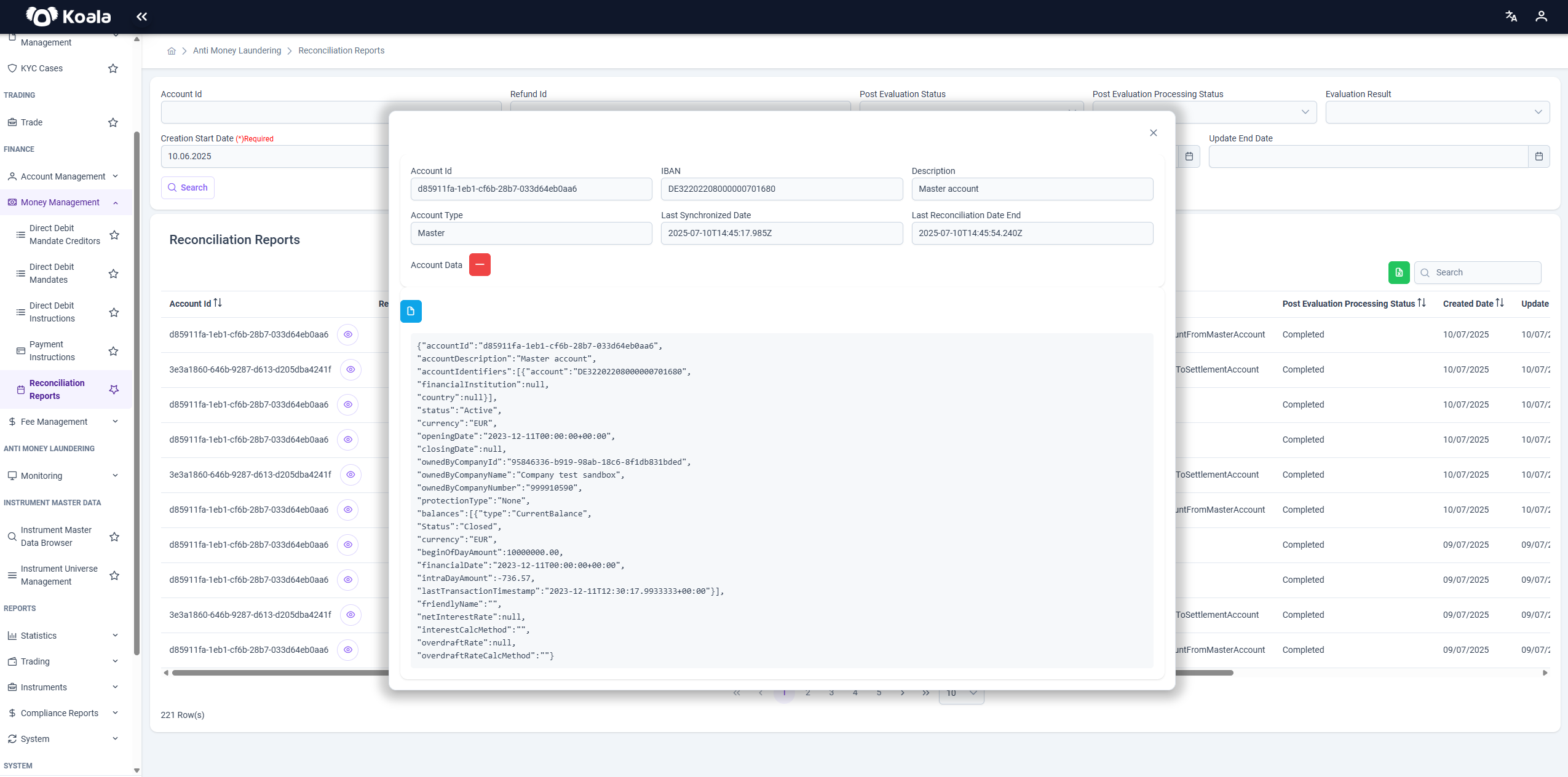
When you click the Account eye icon (in the Account Id column), a modal dialog opens showing account-level details, including:
- Account Id
- IBAN
- Account Type (e.g., Master)
- Account Description
- Last Synchronized Date
- Last Reconciliation Date End
- Account Data (JSON payload)
Account Data JSON
This JSON payload contains a detailed snapshot of the account at the time of reconciliation, such as:
✅ Account metadata (ID, description, status, currency)
✅ Balances and financial figures
✅ Ownership information
✅ Transaction limits, rates, flags
Fields like accountId, status, currency, balances, and ownedByCompanyName are particularly important for understanding account state.
🔷 Reconciliation Data Modal
When you click the Action eye icon on the far-right column, a modal appears with the reconciliation transaction details in raw JSON format.
Reconciliation JSON
This JSON represents a single reconciliation transaction with key fields such as:
✅ pIdChannelUser — User or system initiating the transaction
✅ pTxnDate and reportDate — Transaction and report timestamps
✅ customerId — Identifier of the customer
✅ account — IBAN or account number
✅ accountCurrency, debitAmount, creditAmount — Financial details of the transaction
✅ valueDate, instructedAmount, transactionAmount — Key amounts and dates
✅ debtorBankCode, beneficiaryBankCode — Banks involved in the transaction
✅ paymentReferenceNumber, userReferenceNumber — Reference IDs for traceability
✅ creditDebitIndicator — Indicates if transaction was a credit or debit
✅ bankTrnsCodeDomain and bankTrnsCodeFamily — Coded transaction classifications
✅ paymentId — Associated payment instruction ID
✅ lastChangedTimestamp, createdAt — Audit timestamps
Other fields such as remittance information, ultimate debtor/beneficiary, charge bearer, and additional metadata may also be present in the payload.
📝 Summary
The Reconciliation Reports page provides a comprehensive view of financial reconciliation activities, allowing users to:
- Search and filter reconciliation records
- Inspect both account-level and transaction-level details
- View raw JSON payloads for audit and investigation purposes
- Ensure alignment of internal and external financial records
By offering both summarized and granular data, this page supports operational transparency, error resolution, and regulatory compliance.
If you wish, I can also deliver this explanation as a downloadable .md file. Just say the word!