📄 Payment Instructions Reports
A Payment Instruction represents a formal request to process a financial transaction on behalf of the initiating party. In the context of Koala.Markets, it is a structured entity that includes vital information about the payment to be processed, such as the payment ID, debtor/creditor references, amount, status, and timestamps.
Payment Instructions are commonly used in automated or bulk payment processing systems. They play a crucial role in ensuring transactions are correctly tracked, auditable, and reconciled throughout the system.
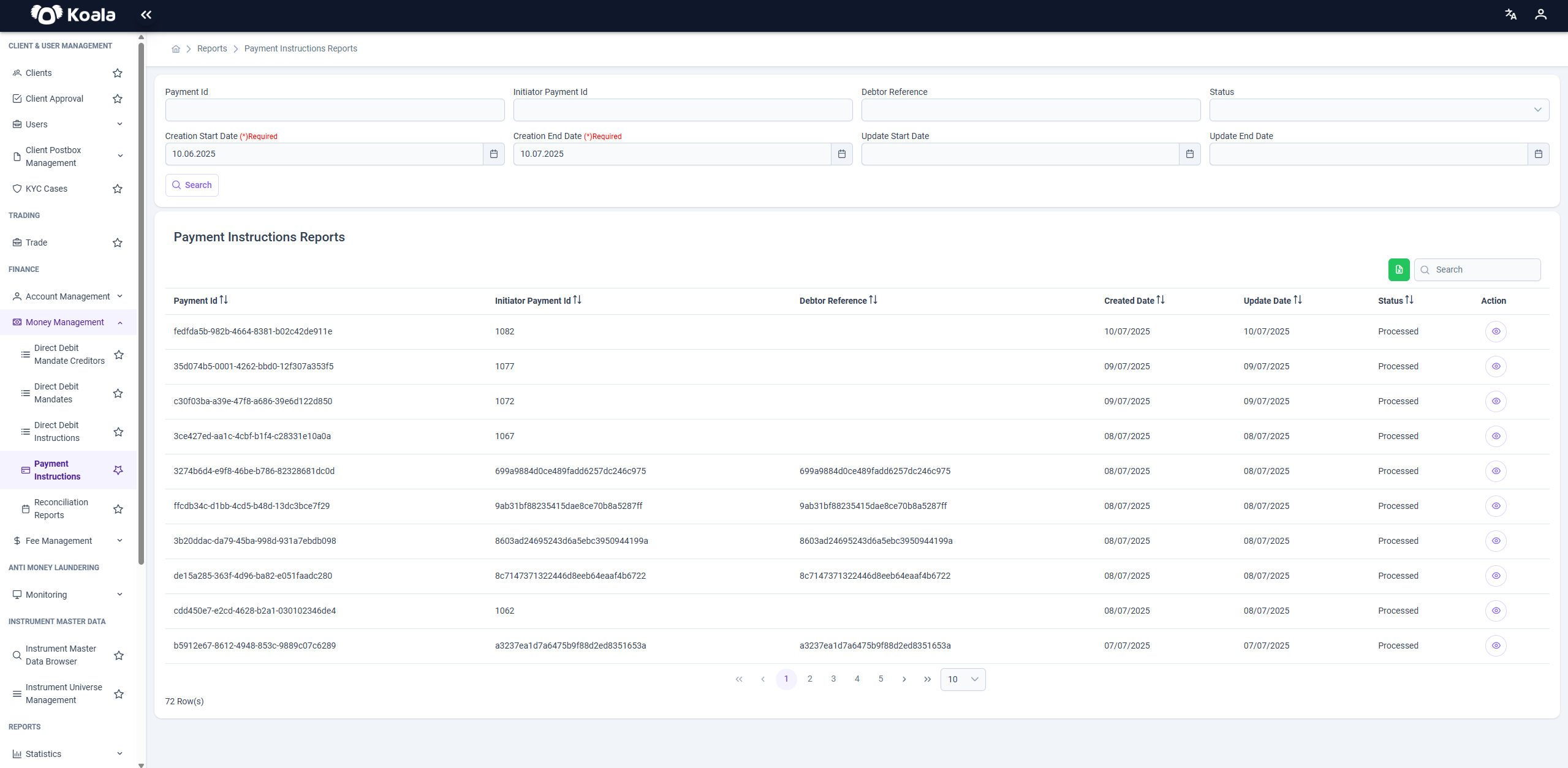
🔍 Filters
Located at the top of the page, these filters allow the user to narrow down the data based on various attributes:
- Payment Id: Search for a specific Payment Instruction by its unique identifier.
- Initiator Payment Id: The original payment ID from the initiating system.
- Debtor Reference: Used to locate the transaction associated with the payer.
- Status: Filter instructions by processing status (e.g., Processed, Failed).
- Creation Start Date / End Date (Required): Define the date range of the instruction creation.
- Update Start Date / End Date: Optional filters for update timestamps.
📌 Note: Creation Start Date and End Date are mandatory for search execution.
📋 Grid / Table Columns
The data grid shows the results based on the applied filters. It includes the following columns:
- Payment Id: System-generated UUID representing the payment instruction.
- Initiator Payment Id: Reference from the initiating system.
- Debtor Reference: Unique identifier tied to the payer or account holder.
- Created Date: The date when the instruction was first generated in the system.
- Update Date: The last date the instruction was updated (e.g., status change).
- Status: Indicates the processing state of the instruction (e.g., Processed).
- Action: Provides a button for further inspection of the payment details.
⚙️ Action Button Functionality
Each row contains an Action button (represented by an eye icon 👁️). Clicking this button opens a modal dialog or detail panel that displays the raw JSON payload for the corresponding Payment Instruction.
📦 Payload Details
The JSON payload typically contains:
- Full payment metadata
- Creditor and debtor references
- Amount and currency
This is especially useful for technical support, auditing, troubleshooting, and regulatory review purposes.
🔄 Pagination & Export
- Pagination: Users can navigate through result pages using the pagination controls at the bottom.
- Export: A green export button allows downloading the currently filtered result set (e.g., Excel or CSV format).
✅ Summary
The Payment Instructions Reports screen is a critical monitoring and operational tool for financial administrators. It enables:
- Full visibility into outgoing payment flows
- Detailed inspection of transaction metadata
- Filtering and auditing capabilities
- Operational efficiency through export and review tools
By offering access to both summarized and raw payment data, this screen supports regulatory compliance, error resolution, and transparency in payment operations.