Direct Debit Mandate
This document explains the concept of a Direct Debit Mandate, its role in the Koala platform, and the features available on the Direct Debit Mandate page.
🔷 What is a Direct Debit Mandate?
A Direct Debit Mandate is a legal and contractual authorization given by a debtor (payer) to a creditor (payee) allowing the creditor to initiate direct debit transactions from the debtor's bank account.
It forms the foundation of any direct debit process by ensuring that the debtor has explicitly agreed to allow funds to be collected.
Why it Matters:
- Mandates are required to ensure compliance with banking and regulatory requirements.
- They protect both parties by documenting consent and terms of the arrangement.
- Each mandate defines the rules (validity period, sequence types, creditor, debtor details) for all subsequent direct debit instructions derived from it.
In the Koala platform, mandates are stored, tracked, and managed in a structured, auditable way, linking them to creditors, bank accounts, and direct debit instructions.
📋 The Direct Debit Mandate Page
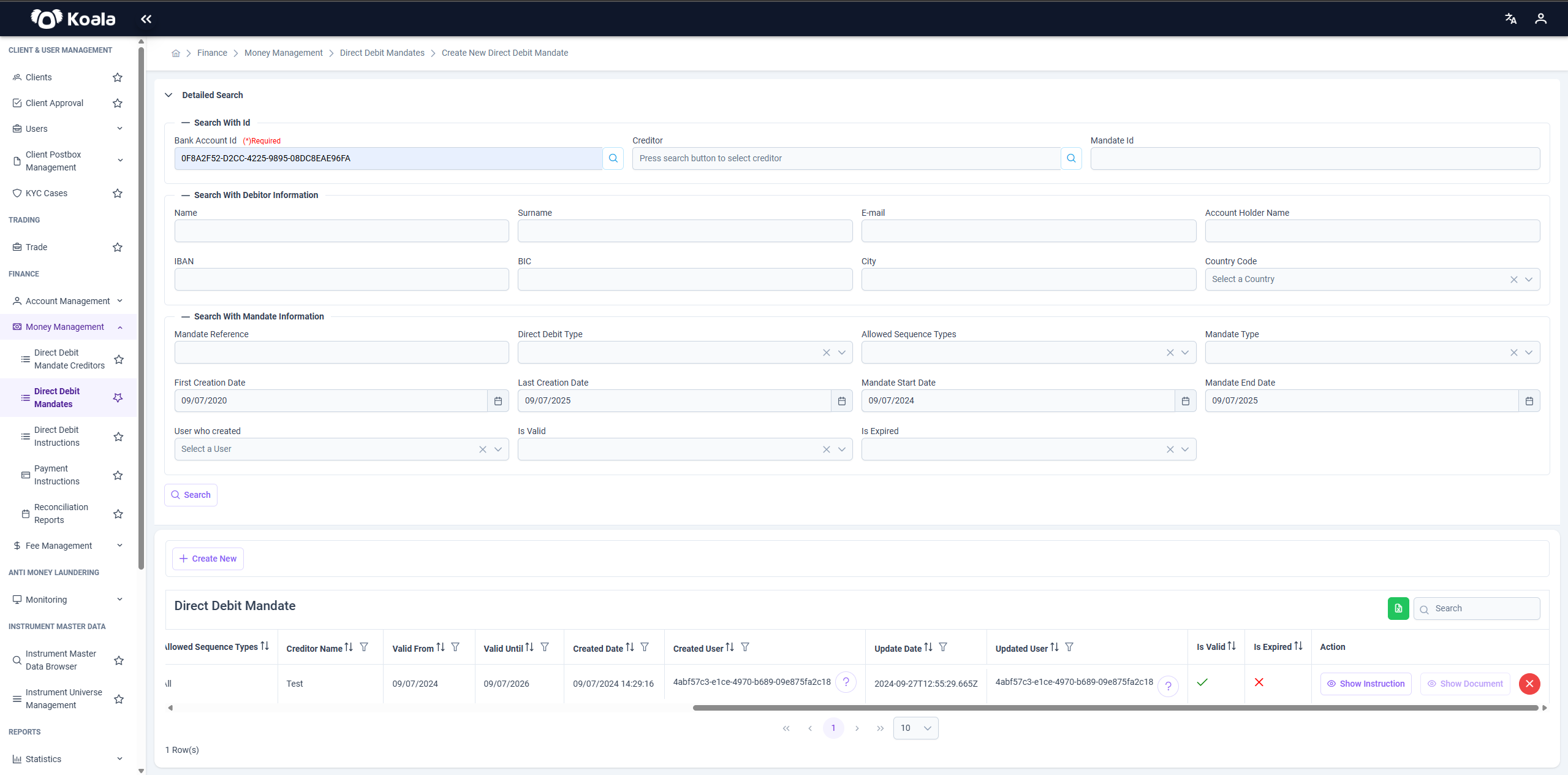
The Direct Debit Mandate page under the Money Management module allows users to:
- Create, view, and manage direct debit mandates.
- Search and filter mandates based on various criteria.
- Review mandate details and linked documents or instructions.
- Export data for reporting or audit purposes.
🔍 Search & Filters
At the top of the page, you’ll find the Detailed Search panel.
This allows you to refine your search based on debtor, mandate, and creditor information.
Important:
While there are many optional fields, the Bank Account Id field is mandatory to perform a search.
Once the required Bank Account Id is entered, you can click Search to display results matching your criteria.
Create Direct Debit Mandate
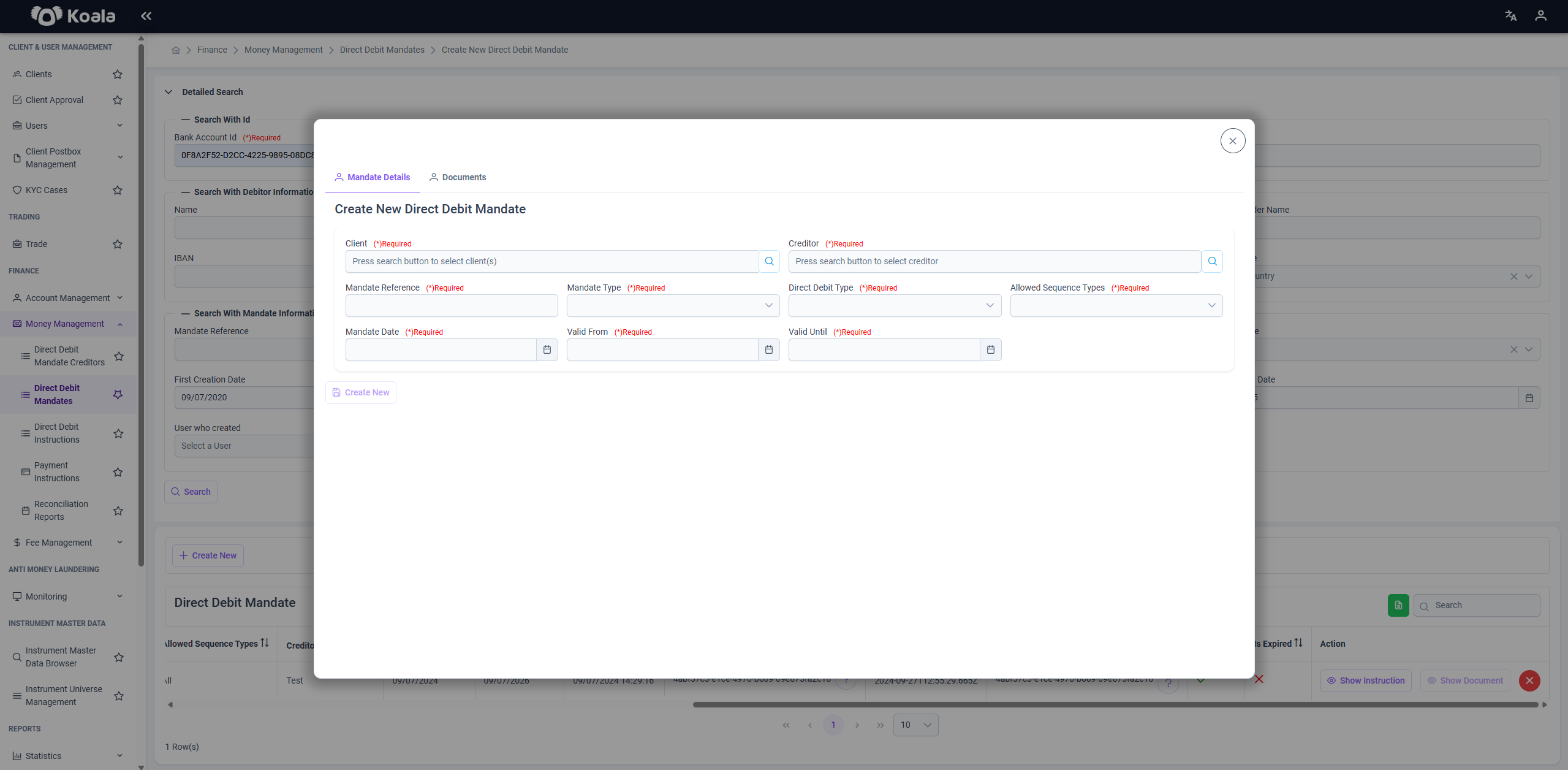
This guide explains how to properly create a new Direct Debit Mandate in the Koala platform, with a detailed description of each required and optional field in the form.
A Direct Debit Mandate represents the debtor’s authorization for a creditor to collect payments from the debtor’s account under agreed conditions.
It ensures compliance with regulatory frameworks and serves as the basis for initiating Direct Debit Instructions.
📝 Mandatory Fields
When creating a mandate, the following fields are required and must be filled in before saving:
| Field | Description | Notes |
|---|---|---|
| Client | The client (debtor) for whom the mandate is being created. | Select an existing client from the system. |
| Creditor | The registered creditor authorized to collect payments. | Must already exist in the system as a Direct Debit Mandate Creditor. |
| Mandate Reference | A unique reference string identifying this mandate. | Ensures traceability and uniqueness. |
| Mandate Type | The type of mandate. | Choose between: electronic or paper. |
| Direct Debit Type | The direct debit scheme under which the mandate operates. | Options: core, cor1, b2b. |
| Allowed Sequence Types | Defines whether the mandate allows single or recurring debits. | Options: only single debit, only recurring, all. |
| Mandate Date | The date the mandate was signed or becomes effective. | Should align with the debtor’s consent date. |
| Valid From | The start date from which the mandate is considered valid. | Cannot be later than the Valid Until date. |
| Valid Until | The end date after which the mandate expires. | Should reflect the agreed duration of the authorization. |
📄 Optional Field
| Field | Description |
|---|---|
| Documents | Upload any supporting documentation (e.g., signed forms, scanned agreements). |
🎯 Action Buttons
In the Action column of each row, you can perform the following operations:
-
📄 Show Document
Opens and displays the documents associated with the mandate (e.g., signed agreement files). -
🔁 Show Instruction
Opens the list of Direct Debit Instructions that have been created based on this mandate.
Within the Direct Debit Instructions page, each instruction has its own Action column where you can click Show Execution to view the detailed Direct Debit Executions derived from the instruction.
This allows full traceability from mandate → instruction → execution.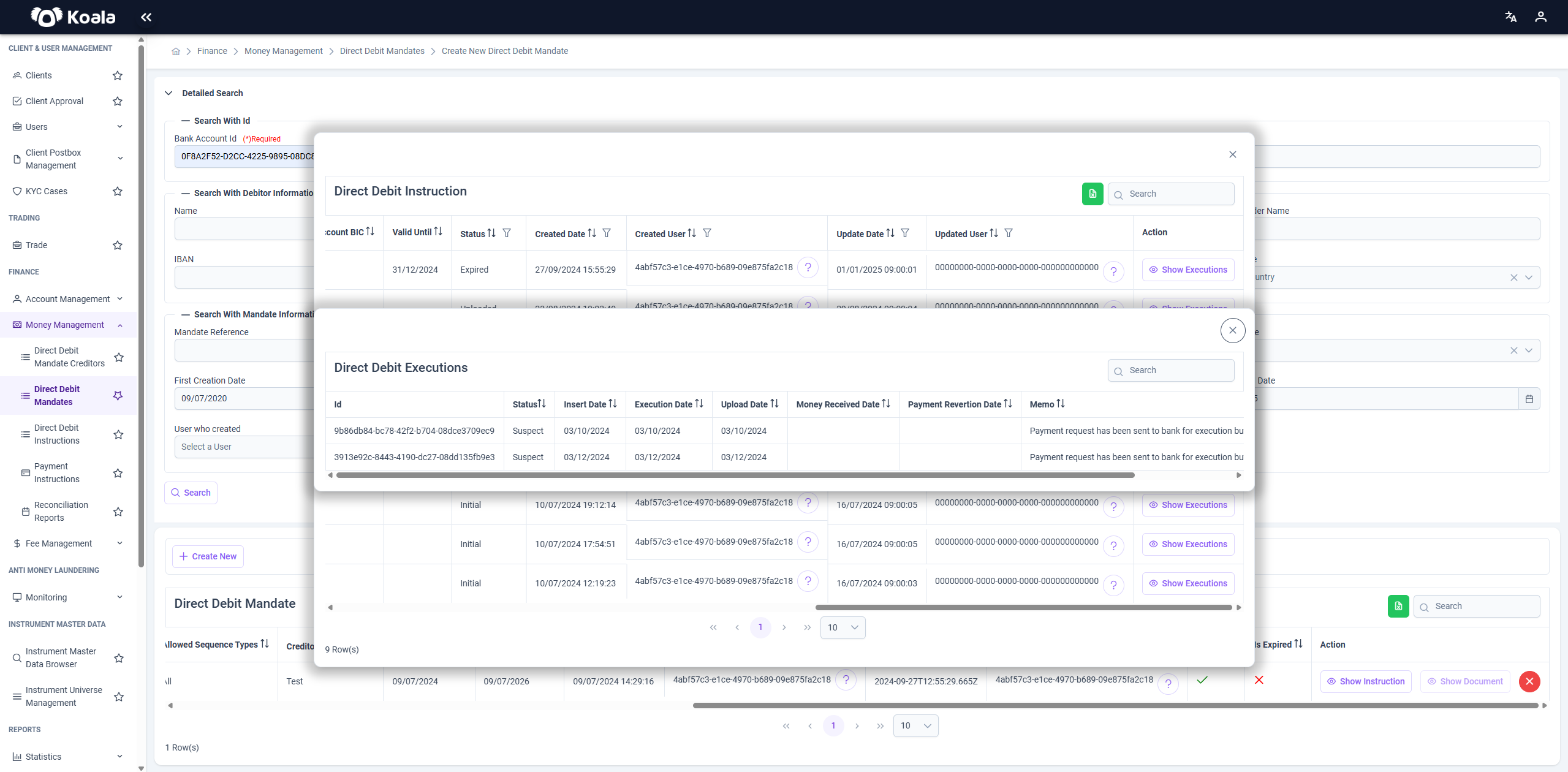
-
❌ Invalidate
Marks the mandate as invalid, making it unusable for future direct debit transactions while keeping it in the system for audit purposes.
📤 Export to Excel
The page provides an option to export the currently displayed list of mandates into an Excel file.
This is useful for reporting, compliance reviews, or further offline analysis.
📝 Summary
The Direct Debit Mandate page is a critical component of the Koala platform’s Money Management module, enabling you to:
- Securely store and manage debtor consents for direct debits.
- Trace the lifecycle of a direct debit from mandate through execution.
- Maintain auditability and compliance with regulatory standards.
With features like detailed search, action buttons for linked records and documents, and Excel export, this page supports efficient and transparent mandate management for financial operations.