📑 Outgoing Custody Transfer
The Outgoing Custody Transfer module is used to transfer client assets (trade positions) from one custodian or bank to another.
This process is typically initiated when a client requests that their securities be moved from the current custodian (e.g., Clearstream) to a new target bank.
Outgoing custody transfers ensure that client portfolios remain intact while changing the custodian responsible for safekeeping and settlement.
- This page is accessible only by the following roles:
tenant_admintenant_customer_supporttenant_apitenant_managementtenant_approval
🎯 Purpose
- To enable the reallocation of securities (trade positions) between different custodians or banks.
- To allow clients to consolidate or move holdings according to their preferences.
- To provide a transparent and auditable process for managing custody transfers.
🚀 Initiate Outgoing Custody Transfer
The initiation of an Outgoing Custody Transfer involves selecting the deposit account, determining which positions will be transferred, and providing target bank information. This process ensures that asset transfers are properly structured and compliant with custody rules.
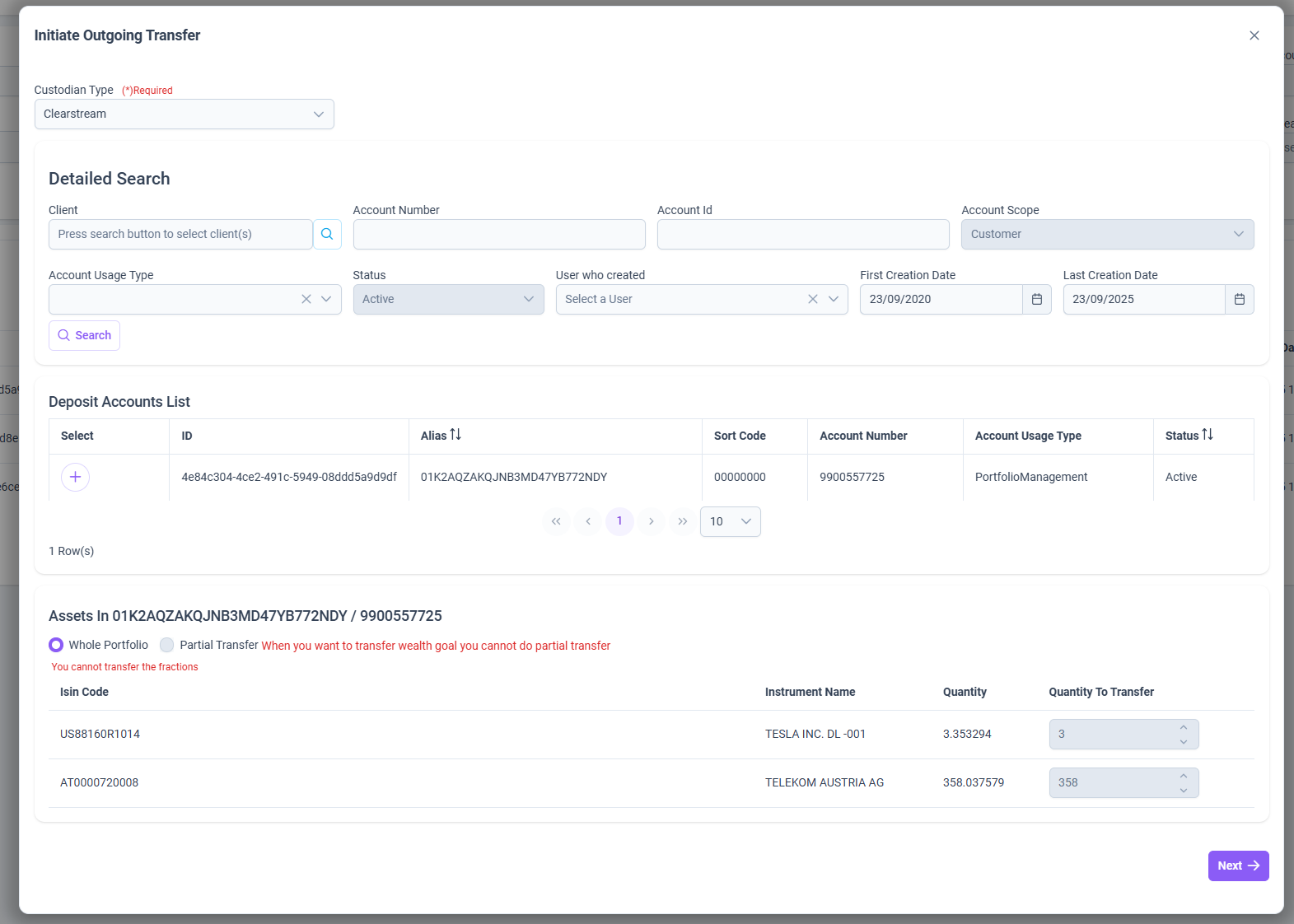
1️⃣ Deposit Account Selection
- The user starts by selecting a Deposit Account.
- The system retrieves all positions held in the chosen account.
- The account’s Usage Type determines the transfer rules:
- Brokerage → Allows partial transfers of selected positions.
- Portfolio Management → Requires whole portfolio transfer.
- ⚠️ When transferring a Wealth Goal, partial transfers are not permitted.
2️⃣ Position Selection
- The system displays all available positions (instruments) linked to the account.
- User selects which positions will be included in the transfer.
- Fractional positions are not allowed → only whole units can be selected for transfer.
- After selection, the user proceeds with Next.
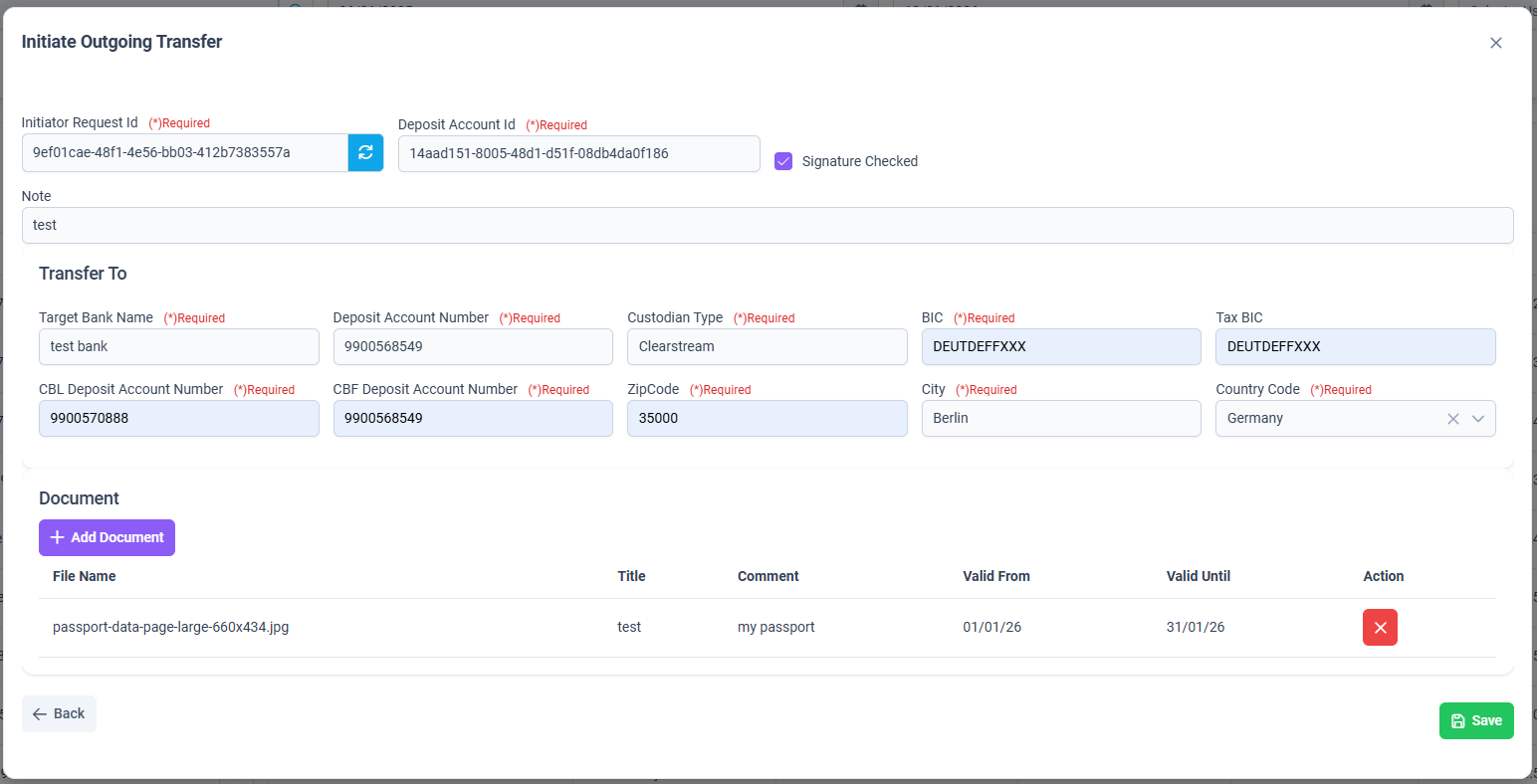
3️⃣ Target Bank Information
- User provides the details of the receiving (target) bank, including:
- Target Bank Name
- Deposit Account Number
- Custodian Type
- BIC / Tax BIC codes
- Address information (Street, City, Zip Code, Country)
4️⃣ Document Attachment (Optional)
- The system allows the user to attach supporting documents to the transfer request.
- Examples:
- Contract copies
- Client authorization letters
- Compliance-related documentation
5️⃣ Initiation & Draft Creation
- Once the required details are completed, the user can initiate the transfer.
- At this stage:
- A new Outgoing Custody Transfer record is created.
- Its initial status is set to Draft.
- The user (initiator) still has the ability to update details, add/remove documents, or cancel the request.
✅ Note: All update operations (positions, target bank, documents, beneficiaries, notes) are only possible while the transfer is in Draft status. Once submitted for approval, the request becomes locked and moves through the approval workflow.
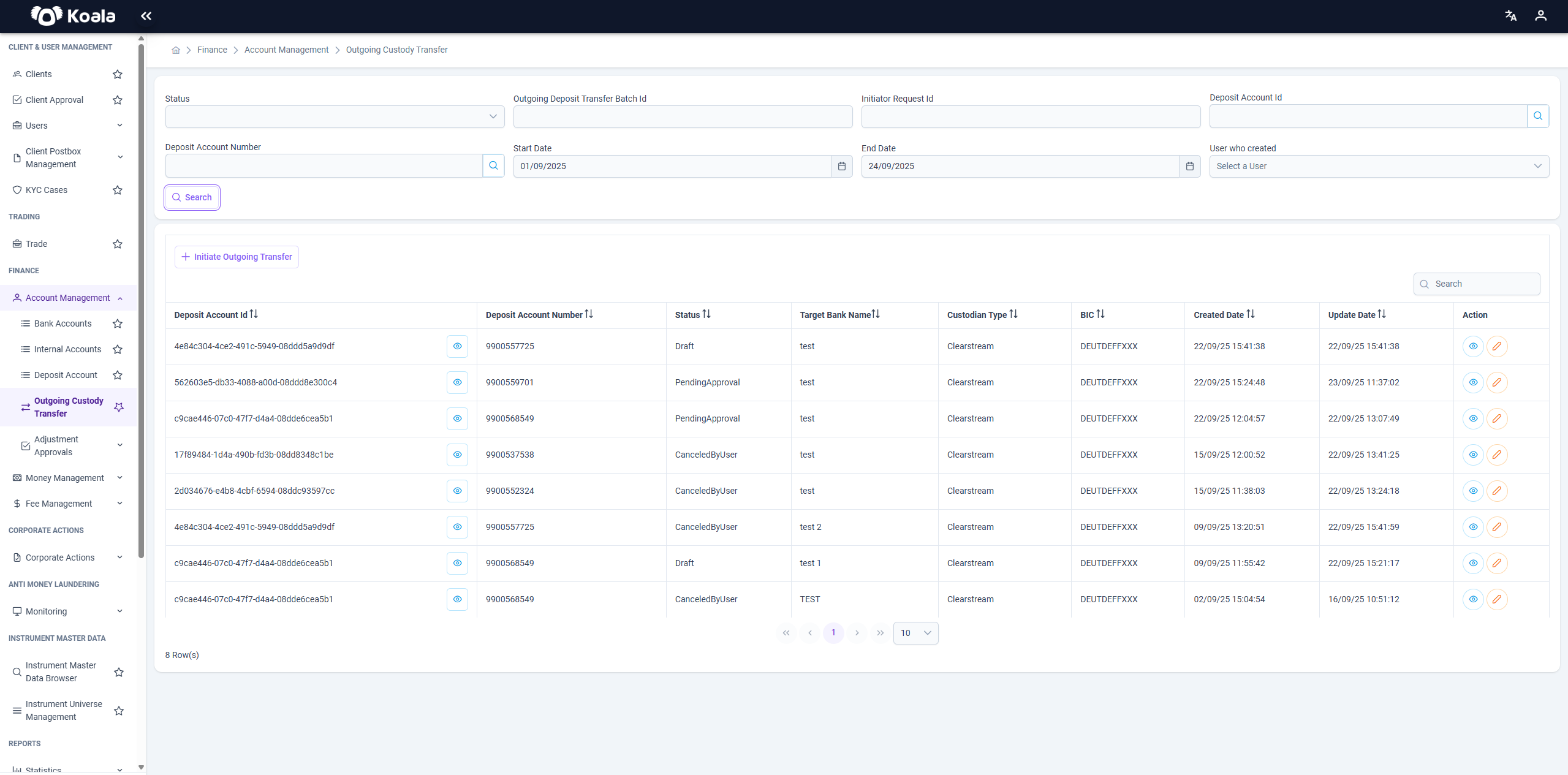
📊 Outgoing Custody Transfer List
The dashboard provides an overview of all custody transfer requests.
Key Columns
- Deposit Account Id → Internal system identifier.
- Deposit Account Number → The account number from which assets are transferred.
- Status → Current state of the transfer (Draft, PendingApproval, Approved, Canceled, etc.).
- Target Bank Name → Destination bank/custodian.
- Custodian Type → The type of custodian (e.g., Clearstream).
- BIC → Bank Identifier Code of the custodian.
- Created Date → When the request was created.
- Update Date → When the request was last updated.
- Action →
- 👁 View → Opens transfer details (see below).
- ✏️ Edit → Opens update screen for modifications.
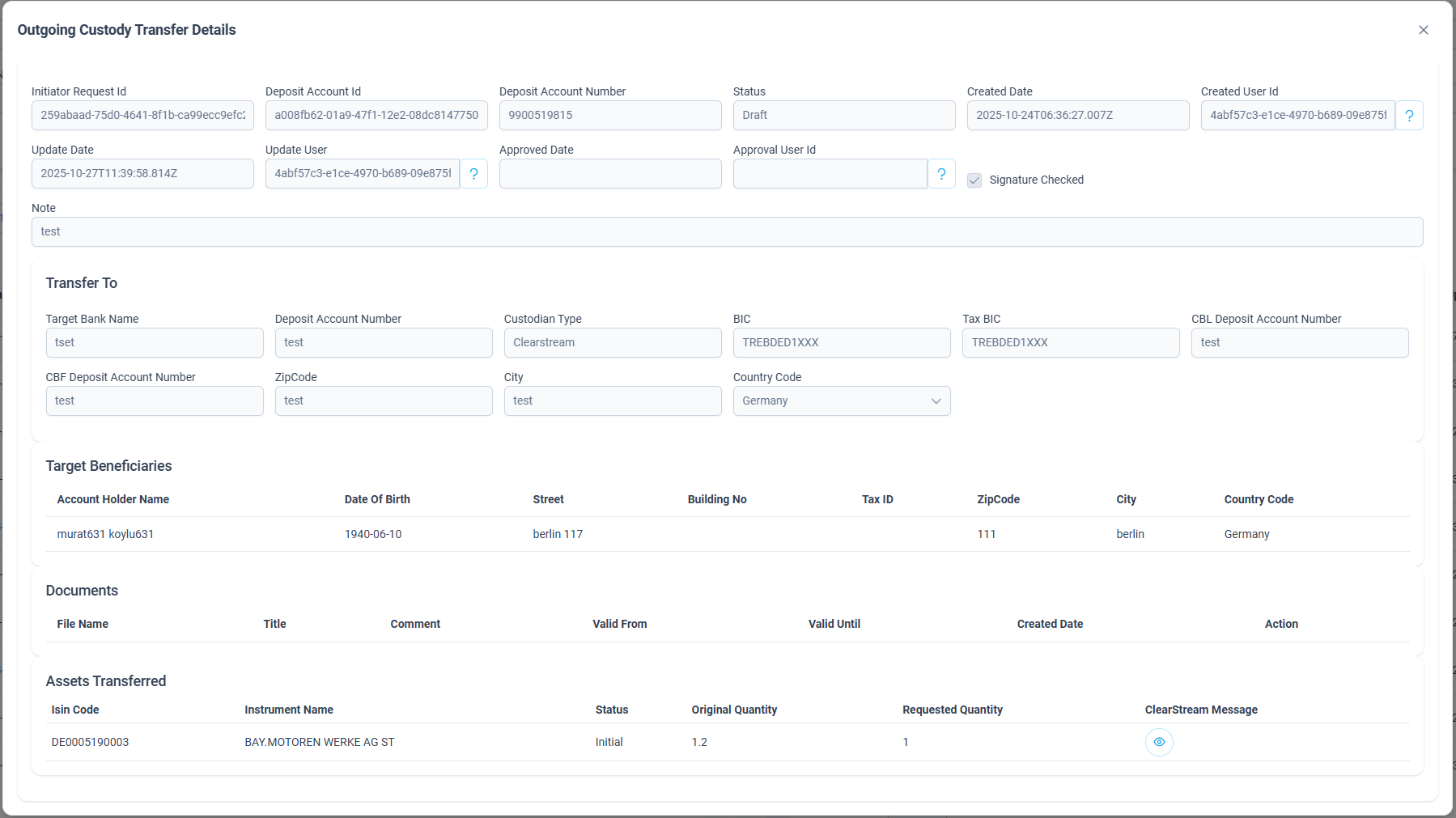
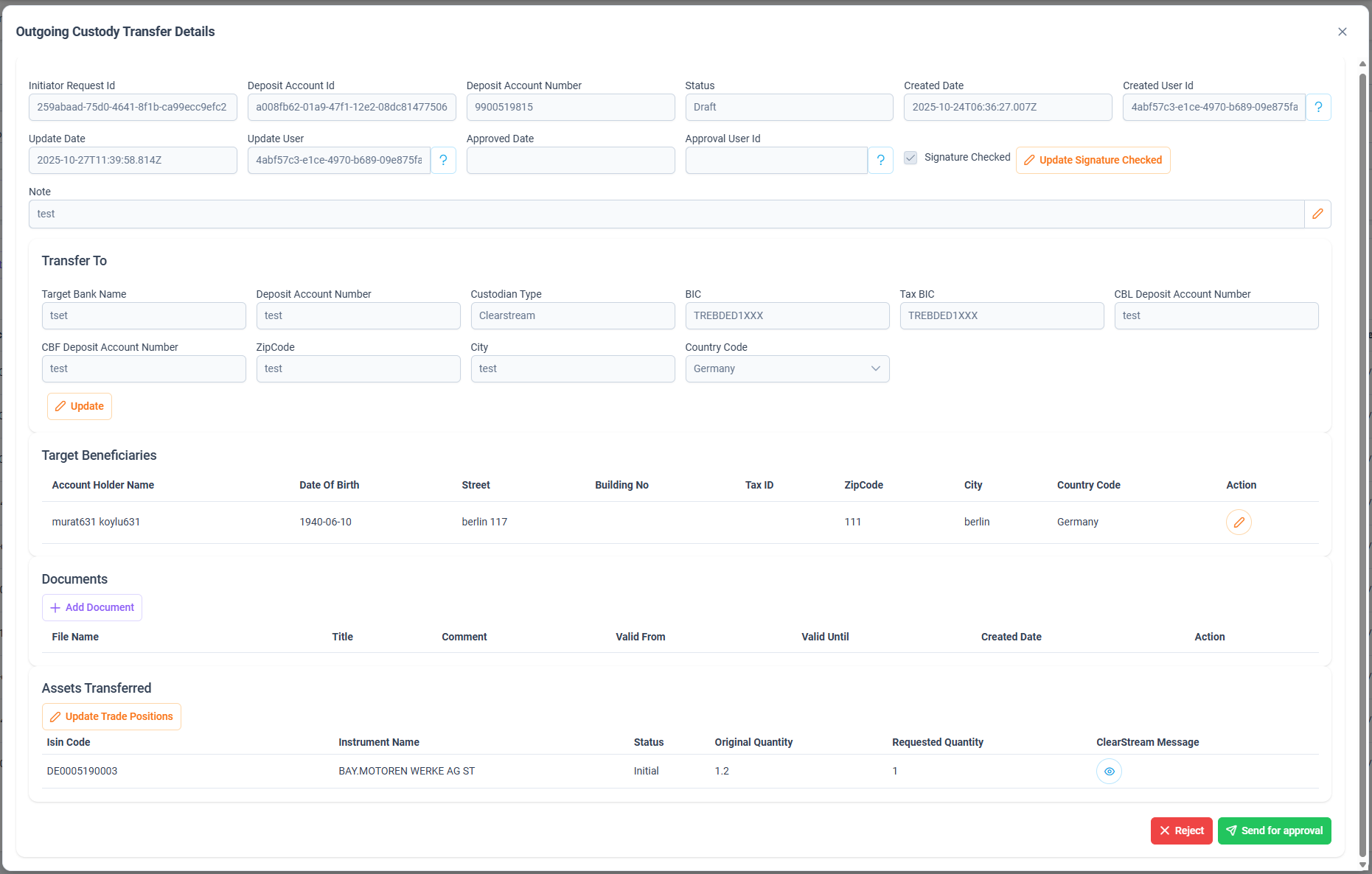
👁 Outgoing Custody Transfer Details
The details view provides full information on a selected custody transfer request:
-
General Information
- Initiator Request Id, Deposit Account Id, Deposit Account Number, Status.
- Created/Updated timestamps and user references.
- Optional Note field.
-
Transfer To (Target Bank Information)
- Deposit Account Number
- Custodian Type
- BIC / Tax BIC
- Target Bank Name
- Address (Street, Zip Code, City, Country)
-
Target Beneficiaries
- Account Holder Name
- Date of Birth
- Address details
-
Documents
- Supporting documentation required for the transfer (e.g., authorization forms).
-
Assets Transferred
- ISIN Code
- Instrument Name
- Original Quantity vs. Requested Quantity
- Custodian (e.g., Clearstream)
✏️ Outgoing Custody Transfer Update
In Edit Mode, the user can:
- ✅ Update Signature Check status
- ✅ Modify Target Bank Information (bank details, custodian type, BIC, etc.)
- ✅ Add or Update Target Beneficiaries
- ✅ Upload Supporting Documents
- ✅ Update or Add Trade Positions (assets to be transferred)
- ✅ Modify Notes (optional commentary for internal tracking)
At the bottom of the update screen, two key workflow actions are available:
- Reject → Cancels the transfer request.
- Send for Approval → Submits the request for approval workflow.
🔄 Outgoing Custody Transfer Workflow
The custody transfer process follows a strict status-based workflow.
Each request moves through the following statuses:
- Draft → Initial state. All edits and updates are only possible in this state.
- Canceled by User → If the initiator cancels the request (Final Status).
- Pending Approval → After clicking Send for Approval (available only in Draft).
- Declined by Approver → If approver rejects the request (Final Status).
- Pending Processing → After approver approval, waiting to be processed.
- Processing → The transfer is in execution.
- Completed → Final state after processing is completed successfully (Final Status).
👥 Approval Roles
Only specific roles within the system have the authority to approve or decline custody transfer requests once they are submitted for approval.
Authorized Roles
tenant_management→ General management authority.tenant_approval→ Explicit approval authority for custody transfers.tenant_admin→ Administrative authority, can review and approve.tenant_customer_support→ Support role with approval rights.
📝 Important Notes
- All updates (bank details, beneficiaries, documents, trade positions, notes) can only be made in Draft status.
- The Send for Approval button is visible only in Draft status.
- Final statuses (no further changes possible):
- ✅ Canceled by User
- ✅ Declined by Approver
- ✅ Completed
✅ Summary
The Outgoing Custody Transfer module provides a structured process for transferring securities between custodians.
It ensures:
- Secure handling of client assets,
- Transparency through detailed records,
- Flexibility by allowing updates to bank, beneficiary, documents, and positions,
- Control via an approval workflow.