📜 Audit Trail
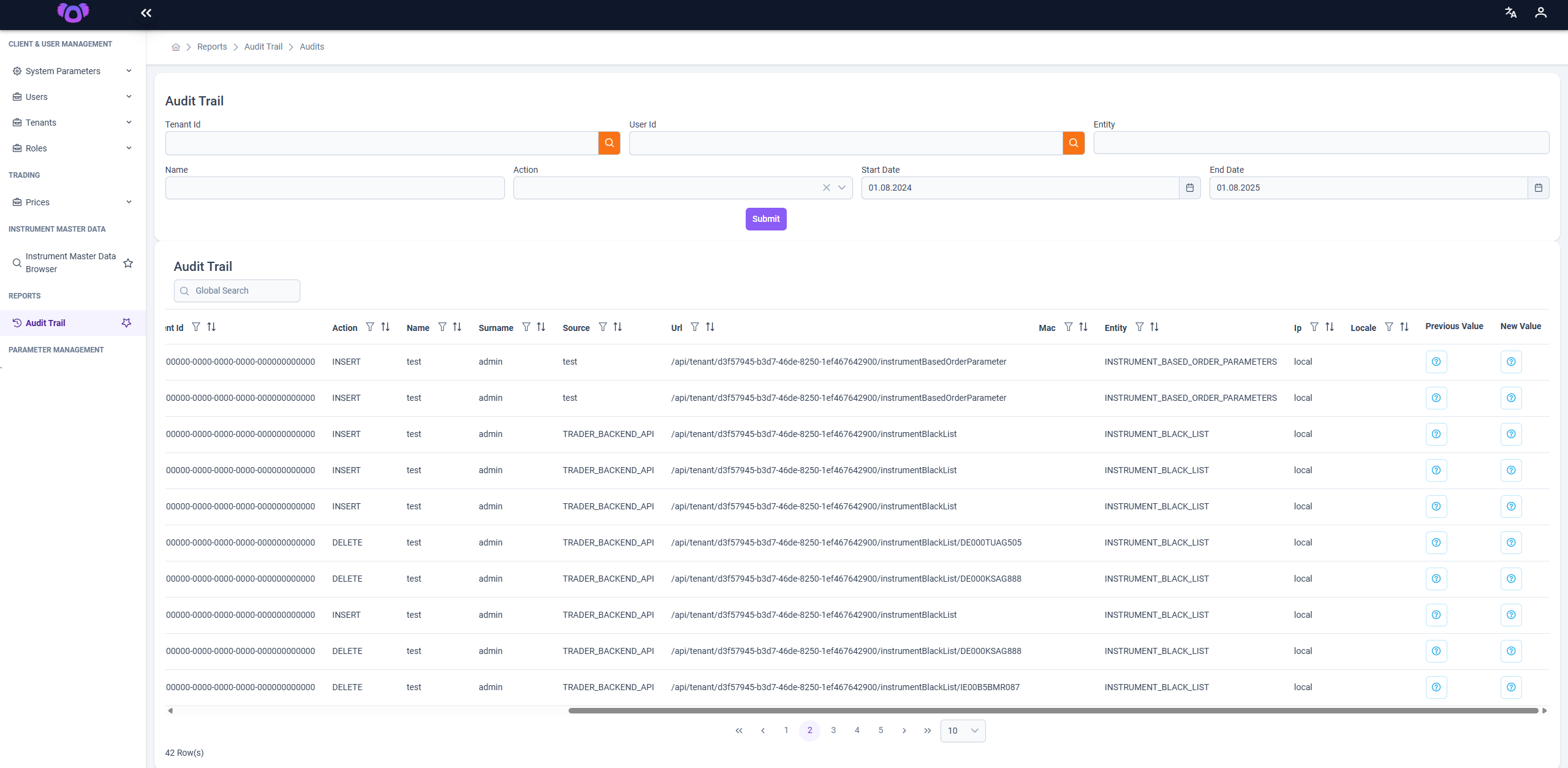
The Audit Trail page provides comprehensive visibility into system activities, enabling users to monitor all data-level operations for auditing, troubleshooting, and compliance purposes.
Access Restriction: This page is accessible only to users with the
power_userrole.
🔍 Filter Criteria
At the top of the page, several filter fields are available to refine the audit logs:
| Field | Description |
|---|---|
| Tenant Id | Filters results by the unique identifier of the tenant. |
| User Id | Filters records by the user who performed the action. |
| Name | Filters by the first name of the user. |
| Surname | Filters by the last name of the user. |
| Action | Filters actions such as INSERT, UPDATE, or DELETE. |
| Entity | Filters based on the affected system entity (e.g., INSTRUMENT_BLACK_LIST). |
| Start Date – End Date | Filters records within a specified date range. |
| Submit Button | Executes the search using the selected filters. |
📂 Audit Trail Table
Beneath the filters, audit records are listed in a structured table with pagination and column-level filtering.
Table Columns
| Column | Description |
|---|---|
| Tenant Id | ID of the tenant associated with the action. |
| Action | The type of operation: INSERT, UPDATE, or DELETE. |
| Name / Surname | The user who executed the operation. |
| Source | Indicates the origin of the action (e.g., TRADER_BACKEND_API). |
| URL | The endpoint or API route involved in the action. |
| Mac / IP / Locale | Metadata capturing the machine, IP address, and locale of the user. |
| Entity | The system object affected by the operation. |
| Previous Value | Clicking the 🔍 icon displays the previous value (if applicable). |
| New Value | Clicking the 🔍 icon displays the new or updated value. |
💡 Notes
- The Global Search bar can be used to perform keyword-based filtering across all records.
- The table supports sorting and filtering on individual columns.
- Pagination controls are available at the bottom, with options to navigate and adjust page size.
- 🔍 Icons open dialogs showing structured data differences between old and new values.
This feature is crucial for maintaining accountability and system transparency, especially in regulated environments.